Enabling automation through an AI tool suite
Have you missed out on writing that fun little piece of code that would have upgraded your sprint deliverables from Economy to First Class?
Chances are that feature is still sitting in your backlog. Or worse, it has leaked into the next sprint, letting your product roadmap get caught in a landslide.
How did this happen? Was it a delay caused by a process in your pipeline that can be transformed? What are some ways to identify bottlenecks? And how do we augment the lifecycle to keep these issues in check? Can AI automation help here?
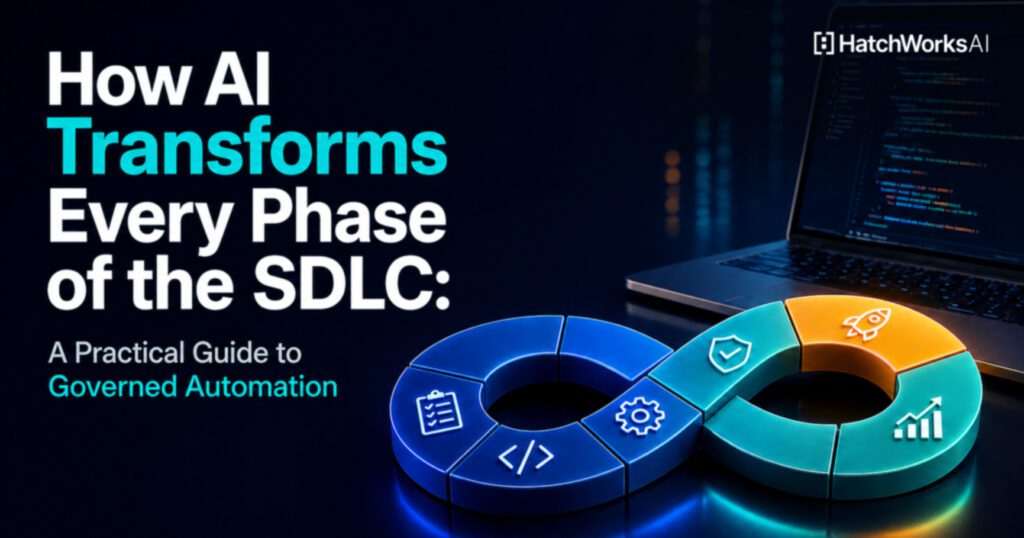
SDLC on Steroids
The good news: In 2026, AI tools are no longer experimental. They are mainstream. According to recent industry research, 90% of developers now use or plan to use AI tools, with 65% of them using them daily. This represents one of the fastest technology adoption curves in software development history.
The harder question: Most organizations already have developers using Copilot, ChatGPT, Cursor, or similar tools. The bottleneck is rarely that teams lack AI tools. It is that they lack governance over how those tools are used. Ad-hoc AI adoption accelerates individual tasks but often shifts bottlenecks downstream, creating inconsistent pull requests, increased review burden, and code that compiles but does not follow project conventions.
In organizations we have assessed, the primary delivery constraint is typically upstream quality (requirements, specifications, acceptance criteria) rather than engineering speed. Fewer than 15% of user stories effectively use dedicated acceptance criteria fields. Roughly 10 to 15% of active development work is rework or reversions from recent releases. The root cause is input quality, not engineering capacity.
This reframes where AI investment should start. Before optimizing code generation, organizations should ask: are we governing AI usage, or just hoping it helps?
This is the core problem that Generative-Driven Development (GenDD) was built to solve. GenDD is not about adding more AI tools. It is about embedding AI, agents, and agentic workflows into the entire SDLC with the governance to make them reliable.
To make visualization of these bottlenecks easier, let us take the example of a team that follows the standard SDLC.
Traditional SDLC: The Baseline
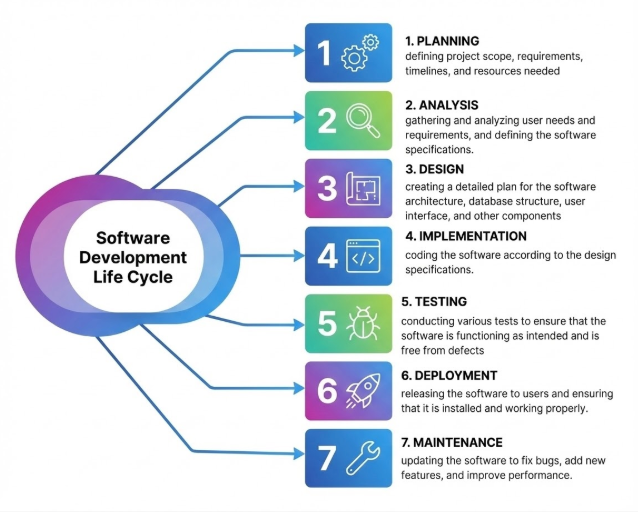
A typical team relying on conventional automation has:
- CI/CD Tools: Jenkins, GitHub Actions for orchestrating builds and deployments.
- Testing Frameworks: Selenium (web UI), Appium (mobile), JUnit (unit testing) for automated test execution.
- Scripting: Custom scripts (Python, Java) to automate specific tasks.
- Version Control: Git for managing code and integration.
This makes the traditional SDLC have these characteristics:
- Rule-Based: Follows predefined scripts and rules.
- Phase-Specific: Automation often confined to specific stages (like testing or deployment).
- Manual Handoffs: Relies on documentation passed between stages, leading to potential context loss.
- High Coding Dependency: Requires skilled developers for scripting.
Let us now focus on specific parts of the SDLC to understand where AI can get plugged in to offload work, with real-world tools and solutions currently available in the market. But first, a critical distinction.
From Ad-Hoc to Governed: Building an AI Scaffolding
Adopting AI tools one at a time (a code completion plugin here, a test generator there) is how most organizations begin. It is a reasonable starting point, but it reaches a ceiling quickly. Individual tools solve individual problems. What they do not solve is the systemic challenge: how does an organization ensure that AI is used consistently, safely, and effectively across every phase of the SDLC?
The answer is what we call an AI scaffolding: a structured, version-controlled set of workflows, playbooks, templates, and context files that govern how AI tools are used across the lifecycle. This is not a product. It is an approach that can be built for any organization, tailored to their tech stack, delivery culture, and compliance requirements.
The Human/AI Boundary
The most practical governance framework we have found is a simple three-tier classification applied to every SDLC activity:
- HUMAN DECISION: Activities that require judgment, domain expertise, or approval authority. AI cannot and should not replace these. Examples: investment decisions, architecture trade-off selection, release approval.
- AI ASSIST: Activities where AI generates drafts, analyses, or recommendations that a human reviews and approves. Examples: requirements expansion, test case generation, code review suggestions.
- AI AUTOMATE: Activities where AI executes governed, repeatable tasks with human oversight but not line-by-line review. Examples: CI/CD pipeline monitoring, stakeholder notification routing, regression test execution.
This taxonomy gives leadership a vocabulary for scoping AI adoption. Instead of asking "should we use AI for testing?" the question becomes "which testing activities are HUMAN DECISION, which are AI ASSIST, and which can we safely AI AUTOMATE?"
Interconnected Frameworks, Not Isolated Tools
Organizations that see the most value from AI-assisted development do not adopt tools in isolation. They build complementary capabilities that feed into each other:
- Requirements Enhancement transforms vague stories into structured, testable specifications
- Test Gap Analysis inventories what tests exist, maps what should exist, and prioritizes remediation
- Context Packs are version-controlled files that feed AI tools repository-specific knowledge (architecture, conventions, domain context, testing standards)
- Architecture Diagrams are C4 models generated from actual code, not drawn from memory
- Codebase Documentation provides structured analysis of legacy and inherited systems with evidence labeling
- E2E Test Generation uses browser-based discovery and test suite creation from live applications
- Project Management Integration exports validated artifacts to Jira, Confluence, or equivalent tools
The output of one framework becomes the input of the next. Codebase documentation feeds into test gap analysis. Test gap analysis informs requirements enhancement. Enhanced requirements drive E2E test generation. The entire chain is governed by Context Packs that ensure AI tools understand the project's actual patterns.
This is what makes GenDD different from simply "using AI tools." It is a methodology, not a product. You can read the full breakdown in the GenDD pillar article.
A Practical Design Choice: Markdown and Version Control
One approach that has proven effective is building the AI scaffolding as version-controlled Markdown files: workflows, playbooks, templates, and agent definitions that are referenced directly by AI assistants (such as those in Cursor or similar AI-native IDEs). No RAG infrastructure, no vector databases, no external platforms. Everything lives in the repository, is reviewable in pull requests, and adapts to any IDE or AI tooling ecosystem.
This matters because the scaffolding itself becomes a versioned artifact. When conventions change, the context files change with them. When new team members join, they inherit the same AI context as everyone else.
Phase 1: Planning
Defining project scope, evaluating business needs, resource expenditure, and timelines against outcomes is typically the goal of this initial stage.
Requirement Translation Gaps and Analysis
This phase is driven by upstream stakeholders who typically have limited visibility into the software system and code structure. They focus on business outcomes and often provide high-level requirements like "Create a customer service chatbot that can answer user FAQs for the payment service."
How AI tools can help: An AI agent can translate vague requirements into concrete functional and non-functional specs. For the example above, it might generate actionable items like user experience design specifications, security features such as PII redaction for chat content, and storage specifications. This reduces additional discovery meetings, rework loops, and frees up time.
Documentation of Proposed Additions
A single source of truth for each proposed component becomes critical for communicating intent from upstream decision-makers to downstream implementers. This documentation should cover how the component aligns with business needs, how it interacts with the rest of the codebase, and what its boundaries are.
How AI tools can help: Stakeholder conversations can be transcribed and fed into an AI agent that generates documentation for a centralized repository accessible to downstream teams. This document gets iteratively updated based on reviewer feedback to ensure alignment with client expectations. For instance, if a client mentions "high speed," the agent would add concrete metrics like response time and throughput to the requirements.
Reviewing the Plan
Once a plan is charted, the planning team reviews it to ensure it meets business needs, is within the boundaries of investment, and accurately informs the next stakeholder who needs to pick it up.
How AI tools can help: An AI agent can cross-check the plan against the original requirements and flag gaps or misalignments before human review. It can validate that budget constraints are respected, highlight dependencies that might have been overlooked, and generate tailored summaries for different stakeholders, giving executives a high-level overview while providing implementers with technical detail.
In Practice: Preserving Upstream Context
A common anti-pattern we observe across organizations: strategic initiatives approved in leadership forums arrive in engineering tools as a handful of bullet points. The strategic context (why this matters, what success looks like, which systems are affected) is compressed or lost entirely.
An AI scaffolding addresses this by expanding approved business capabilities into structured templates covering scope, success metrics, integration impact, architecture impact, and security/compliance considerations. The Human/AI Boundary applies clearly here: business viability and investment decisions remain HUMAN DECISION; structured template generation and gap-flagging are AI ASSIST.
Phase 2: Analysis
This stage involves gathering and analyzing user needs and requirements, and defining software specifications that would fulfill these.
Stakeholder Interviews and Needs Gathering
Conducting interviews, surveys, and workshops with end users and stakeholders to understand their pain points, workflows, and expectations for the software.
How AI tools can help: An AI agent can transcribe and analyze interview recordings, extracting key themes, recurring requests, and implicit needs that stakeholders may not have explicitly stated. It can consolidate input from multiple sources and flag conflicting requirements early, saving analysts from manually sifting through hours of conversation notes.
Requirements Analysis and Prioritization
Once needs are gathered, the team analyzes and organizes them by identifying dependencies, assessing feasibility, and prioritizing based on business value and technical complexity. If the team follows an Agile model, the requirements are prioritized and segregated into Epics, with each modular piece of work added as a Feature in corresponding Epics.
How AI tools can help: An AI agent can categorize requirements by type (functional, non-functional, constraints), map dependencies between them, and suggest prioritization based on predefined criteria like cost, impact, or risk. It can also compare new requirements against historical project data to estimate effort and flag potential scope creep. A parallel AI agent can translate the requirements into Epics and Features and populate a Jira board with activity items or tickets.
Software Specification Definition
This stage translates validated requirements into detailed software specifications, defining system behavior, data flows, interfaces, and acceptance criteria that will guide the design phase. Defining acceptance criteria is a crucial part of this phase since it is fed forward to all subsequent phases.
How AI tools can help: An AI agent can generate draft specifications from approved requirements, ensuring consistent formatting and completeness. It can cross-reference specifications against industry standards or regulatory requirements and identify ambiguities that need clarification before design begins. It can also generate various scenarios to test the code for and add these scenarios onto the list of acceptance criteria.
In Practice: Shift-Left Quality Enforcement
This is, in our experience, the highest-ROI AI intervention in most organizations. We call it the Story Quality framework: AI transforms vague requirements into structured outputs with seven sections:
- User Story in Given-When-Then format with clear actor, action, outcome, and business value
- Acceptance Criteria in Gherkin format (Given/When/Then) covering happy path and error scenarios
- Edge Cases including null/empty inputs, boundary conditions, multi-tenant isolation, integration failures, accessibility
- Integration Impacts covering affected services, API contract changes, downstream dependencies
- Non-Functional Requirements with performance targets that use measurable thresholds (e.g., "<200ms p95" not just "fast")
- Test Scenarios mapped to each AC for QA traceability
- Technical Questions surfacing ambiguities requiring product team clarification before sprint commitment
The practical impact is significant. When acceptance criteria are structured and testable before development starts, QA validates expected behavior instead of discovering requirements. Rework drops. Sprint predictability improves.
An additional capability worth highlighting: AI agents can validate written acceptance criteria against a live application via browser automation (such as Playwright MCP), confirming that referenced UI elements exist, selectors are available, and outcomes are programmatically assertable, all before a single line of implementation code is written.
Phase 3: Design
This phase involves creating a detailed plan for software architecture, database structure, user interface, and related components.
Software Architecture Design
A critical necessity for most teams is the presence of software architecture diagrams that clearly illustrate the flow of code between multiple components. A visual representation facilitates designing new modules and integrating these new modules of software with the existing technical architecture. There are standard models of architecture documentation, such as the C4 standard, that teams use to communicate and align on software architecture.
How AI tools can help: An AI agent can suggest architectural patterns based on the project's requirements and constraints, flagging trade-offs between options. Each software module in the project's repository can be analyzed by an AI agent and given its own diagram to inform project teams about the flow of data and processing logic within the module. The agent can also validate proposed architectures against best practices and identify potential bottlenecks or security vulnerabilities before implementation begins.
Database Design and Data Modeling
The team designs the database structure, defining entities, relationships, schemas, and data flows that will support the application's functionality and performance needs.
How AI tools can help: An AI agent can generate initial data models from requirements documentation, suggest normalization strategies, and flag potential issues like redundancy or missing relationships. It can also recommend indexing strategies based on anticipated query patterns and data volume.
User Interface and Component Design
This stage focuses on designing the user interface and defining how individual components will function, including creating wireframes, mockups, and detailed specifications for each module.
How AI tools can help: An AI agent can generate UI wireframes based on user requirements and accessibility standards. It can review designs for consistency, ensure alignment with brand guidelines, and validate that all specified user flows are accounted for. The agent can also generate component specifications that map directly to the approved UI designs.
In Practice: Brownfield Analysis with the GenDD 4-Pass Framework
Most organizations do not build on greenfield. They inherit codebases with history, hidden dependencies, undocumented decisions, and accumulated technical debt. Traditional approaches to understanding these codebases are slow, inconsistent, and rely heavily on institutional memory that may no longer exist.
The GenDD Brownfield Analysis 4-Pass Framework is a structured method for AI-assisted understanding of inherited systems:
- Pass 1, Scan: Rapidly inventory the repository covering layout, technologies, entry points, build systems, dependencies, and event-driven indicators. Facts only, no inference.
- Pass 2, Infer: Apply reasoning to the inventory by classifying the architecture, tracing critical flows (request, event, batch), mapping data ownership boundaries, and modeling operational behavior.
- Pass 3, Validate (Human-in-the-Loop): Convert uncertainties into a short validation packet for subject-matter experts with 10 to 20 targeted questions, each backed by evidence and impact explanation. Responses are Confirmed, Incorrect, or Partially Correct. This is the bridge between AI-generated hypotheses and human-confirmed facts.
- Pass 4, Document: Produce a comprehensive documentation pack that enables new engineers to safely work in the repository: understand what the system does, navigate modules and services, modify safely without breaking critical paths, and operate and debug in production.
A critical design principle: every AI-generated finding is explicitly labeled as a FACT (directly observable in code, backed by file references) or a HYPOTHESIS (inferred, with a confidence level of High, Medium, or Low). This separation is what makes the output trustworthy rather than dangerously plausible.
The framework also adapts based on detected architecture patterns. A monorepo analysis emphasizes package boundaries and shared dependencies. A microservices analysis focuses on service-to-service communication and contract testing. An event-driven analysis prioritizes message schemas, consumer failure modes, and idempotency. This tailoring ensures the analysis focuses on what matters most for each pattern.
In Practice: Context Packs as the Bridge to Governed AI
The documentation produced during design becomes the foundation for what we call Context Packs, which are version-controlled files that feed AI tools repository-specific knowledge such as:
- agents.md covering AI instructions, constraints, and multi-tenant isolation rules
- context.md covering domain knowledge, glossary, and system overview
- conventions.md covering coding patterns, naming conventions, and project standards
- testing.md covering test requirements, coverage targets, and testing patterns
- architecture.md covering system architecture, service boundaries, and deployment model
Without Context Packs, AI tools generate plausible but wrong code that compiles but does not follow the project's actual conventions, naming patterns, or architectural constraints. With them, generated code matches the project's reality. This is the practical mechanism that turns ungoverned AI usage into governed AI assistance.
Phase 4: Implementation
This phase involves coding the software according to design specifications.
Code Development and Standards Enforcement
Developers write the actual code according to design specifications, building features, integrating components, and ensuring the codebase follows established coding standards and conventions.
How AI tools can help: An AI agent such as Cursor can assist developers by generating code, suggesting implementations based on design specs, and flagging deviations from coding standards in real time. It can also auto-complete repetitive patterns and ensure consistent naming conventions across the codebase.
Test-Driven Development
In this approach, developers write automated tests before writing the actual code, defining expected behavior upfront and then building functionality to pass those tests, ensuring code quality from the start.
How AI tools can help: An AI agent can generate unit and integration tests based on requirements, acceptance criteria, and design specifications before development begins. As developers write code, it can validate that tests are comprehensive, suggest edge cases that may have been missed, and ensure new code does not break existing tests.
Integration and Version Control Management
Focus is on merging code from multiple developers, resolving conflicts, and maintaining a stable codebase through proper version control practices and continuous integration pipelines.
How AI tools can help: An AI agent can predict merge conflicts before they occur, suggest resolution strategies, and automate routine integration tasks. It can monitor CI pipelines, diagnose build failures, and recommend fixes, reducing the time developers spend troubleshooting integration issues.
In Practice: Governed AI Assistance in Development
Here is a pattern we see repeatedly: an organization adopts an AI code assistant (Copilot, Cursor, Antigravity) and sees immediate productivity gains. Developers generate code faster. But within weeks, a second-order problem emerges: the generated code is syntactically correct but does not follow the project's conventions. PRs become inconsistent. Review burden increases. Teams that relied on senior engineers for knowledge transfer find that the AI has no access to that tribal knowledge.
Context Packs solve this directly. The five files described in the Design phase feed AI tools the specific system intent, workflows, and conventions needed to generate code that compiles and adheres to the project's actual standards. When conventions change, the context files are updated in version control. Every developer gets the same AI context.
Another practical application: role-based developer playbooks. An AI agent analyzes the codebase's backend patterns (request flow, API conventions, error handling, data access patterns) or frontend architecture (component patterns, state management, styling conventions) and generates a developer guide from the code itself. New engineers can safely become productive in days rather than the weeks or months typically required for legacy codebases.
To see what this looks like in practice, read A Day in the Life of an AI Software Developer.
Phase 5: Testing
This phase involves conducting various tests to ensure that the software is functioning as intended and is free from defects.
Test Planning and Strategy
A QA team defines the testing approach by determining what types of tests are needed (unit, integration, system, acceptance), setting coverage targets, and allocating resources for the testing effort.
How AI tools can help: An AI agent can analyze requirements and code complexity to recommend an optimal testing strategy. It can identify high-risk areas that need more rigorous testing, estimate testing effort based on historical data, and generate test plans that ensure comprehensive coverage across all functional areas.
Test Case Development and Execution
The team creates detailed test cases based on requirements and design specifications, then executes them systematically to verify that the software behaves as expected under various conditions.
How AI tools can help: An AI agent can automatically generate test cases from requirements documentation and ensure traceability between tests and specifications. During execution, it can prioritize tests based on recent code changes, identify flaky tests, and parallelize test runs to reduce feedback time.
Defect Identification and Regression Testing
When tests fail, defects are logged, triaged, and assigned for fixing. Regression testing ensures that fixes do not introduce new problems and that previously working functionality remains intact.
How AI tools can help: An AI agent can analyze failed tests to pinpoint root causes, suggest likely code locations for bugs, and auto-generate defect reports with relevant context. For regression testing, it can intelligently select which tests to rerun based on code changes, reducing unnecessary test cycles while maintaining confidence in software stability.
In Practice: Systematic Test Gap Analysis and E2E Generation
Test Gap Analysis replaces the ad-hoc "we should write more tests" approach with a structured plan. The pattern works in six phases:
- Inventory all existing tests by type and location
- Map what tests should exist based on component criticality and business risk
- Generate a gap matrix showing coverage vs. requirements
- Produce a risk heat map highlighting the most dangerous uncovered areas
- Create prioritized remediation recommendations with effort estimates
- Build a sprint-by-sprint implementation roadmap
Browser-based E2E test generation takes this further. An AI agent navigates a live application via browser automation (Playwright MCP), discovers UI elements and selectors, and generates a complete E2E test suite: Page Object models, happy path tests, validation tests, error handling tests, and accessibility tests. The key rules are strict: use only data-testid selectors (no CSS class or XPath), use explicit waits (never arbitrary timeouts), follow the Arrange-Act-Assert pattern, and ensure each test is independent.
A governance mechanism worth adopting: automation deferral tracking. When teams defer test automation, the reason is documented and tracked as intentional debt, not invisible backlog. Repeated deferral above a threshold (e.g., >20% of stories in a sprint) triggers leadership review. This turns invisible technical debt into visible, manageable debt.
Phase 6: Deployment
This phase involves releasing the software to users and ensuring that it is installed and working properly.
Release Preparation and Environment Configuration
This stage involves preparing the software for release by configuring production environments, setting up servers, and ensuring all dependencies and infrastructure are in place for a smooth deployment.
How AI tools can help: An AI agent can validate that production environments match staging configurations, flag missing dependencies, and auto-generate deployment checklists based on the application's requirements. It can also detect configuration drift between environments and recommend corrections before deployment begins.
Deployment Execution and Rollout
The team deploys the software to production, whether through a full release, phased rollout, or blue-green deployment, while minimizing downtime and ensuring users experience a seamless transition.
How AI tools can help: An AI agent can automate deployment scripts, monitor the rollout in real time, and flag anomalies as they occur. It can manage feature flags for gradual rollouts, coordinate deployment timing across regions, and trigger automatic rollbacks if critical errors are detected during release.
Deployment Automation and Infrastructure as Code
This stage focuses on creating reusable deployment artifacts, such as Terraform scripts, Docker configurations, and CI/CD pipelines, that enable consistent, repeatable deployments across environments.
How AI tools can help: An AI agent can generate infrastructure-as-code templates based on application requirements, ensuring best practices for security and scalability. It can review Terraform or Kubernetes configurations for errors, suggest optimizations, and maintain version-controlled deployment artifacts that stay in sync with application changes.
In Practice: Delta Analysis and Release Readiness
Delta Analysis is triggered when a pull request is opened or a release is prepared. An AI agent analyzes the impact of changes between two reference points (branches, tags, or commits): categorizing affected files, mapping changes to documentation that needs updating, generating a risk matrix, and recommending pre-merge versus post-merge actions. This replaces the manual effort of tracing change impact across a codebase.
Structured release readiness assessments take this a step further. An AI agent generates a GO / NO-GO / CONDITIONAL recommendation based on test coverage, Definition of Done compliance, breaking change analysis, and security review status. Release packages include AI-generated evidence: coverage reports, compliance checklists, and changelogs. This accelerates the governance cycle without bypassing it. The decision remains human, but the evidence is assembled automatically.
Industry Solutions: Spacelift + Saturnhead AI (infrastructure orchestration with AI assistant), Jenkins X (AI-predicted build failures, automated rollbacks), AWS CodeGuru (ML-powered code review and performance recommendations).
Phase 7: Maintenance
This phase involves updating the software to fix bugs, add new features, and improve performance.
Post-Deployment Monitoring and Issue Detection
Once the software is live, the team continuously monitors system health, tracks performance metrics, and identifies issues before they impact users.
How AI tools can help: An AI agent can analyze logs, traces, and metrics in real time, detecting anomalies and correlating patterns to identify root causes. It can alert teams to degraded performance or emerging issues, predict potential failures based on trends, and suggest remediation steps before problems escalate.
Bug Fixing and Patch Management
As users report issues or monitoring uncovers defects, the team triages, prioritizes, and fixes bugs, releasing patches that address problems without disrupting existing functionality.
How AI tools can help: An AI agent can analyze bug reports and error logs to suggest likely root causes and relevant code locations. It can prioritize bugs based on severity and user impact, generate fix recommendations, and validate that patches do not introduce regressions before they are released.
Feature Enhancements and Performance Optimization
Over time, the software evolves. New features are added based on user feedback, and performance is tuned to handle growing usage, changing requirements, and emerging technologies.
How AI tools can help: An AI agent can analyze user feedback and usage patterns to recommend high-value feature additions. It can identify performance bottlenecks through code and query analysis, suggest optimizations, and benchmark changes against baseline metrics to ensure improvements are measurable and meaningful.
In Practice: Recurring Maintenance and Delivery Health Signals
The most common failure mode in AI-assisted development is not the initial setup. It is drift. Context Packs go stale. Documentation falls behind. Test coverage erodes. The AI scaffolding that worked well three months ago is now generating code against outdated conventions.
Recurring maintenance playbooks address this with scheduled AI-assisted activities:
- Sprint boundaries: Test coverage review. Re-run gap analysis, compare with previous results, track trends, generate sprint-level remediation plans.
- Quarterly: Context Pack refresh. Update architecture, conventions, testing standards, and domain context files to reflect current reality.
- Post-merge/release: Incremental documentation update. Delta analysis identifies what changed, maps changes to documentation sections, updates only affected content.
Delivery Health Signals provide leadership with an objective view of whether the AI transformation is working. Concrete examples:
- Story reopen rate: Healthy <5%, Warning 5 to 10%, Critical >10%. High rates indicate requirements quality problems.
- QA-discovered requirements: Requirements discovered during testing, not before. This is a direct measure of upstream quality.
- Automation deferral rate: Healthy <10%, Warning 10 to 20%, Critical >20%. High rates indicate growing invisible technical debt.
- Security blocks at release gate: Security issues discovered at release time rather than during development. These are expensive to fix and indicate missing shift-left practices.
Role-specific maintenance playbooks extend this further: SREs get observability audits (logging, metrics, alerting, SLO/SLI assessment, runbook completeness), Support Engineers get troubleshooting guide generation (FAQs, error code references, escalation paths), and Engineering Managers get delivery health dashboards (DORA metrics, bus factor analysis, tech debt ROI calculations).
Orchestrating the Lifecycle: The Playbook System
We experimented with the concept of an Orchestrator agent that manages the entire workflow and validates outputs between phases. In practice, we have found that a Playbook System serves this function more effectively than a single orchestrating agent.
A Playbook System organizes AI-assisted activities by trigger and by role:
- Onboarding playbooks run once when a team inherits a new codebase (e.g., the 4-pass Brownfield Analysis).
- On-demand playbooks are triggered by specific situations: requirements enhancement, test gap identification, database schema analysis, CI/CD pipeline audit, observability review, support documentation generation, and more.
- Role-based playbooks are tailored analysis templates for every SDLC stakeholder: Architect, Backend Developer, Frontend Developer, QA Engineer, DBA, DevOps Engineer, Security Engineer, SRE, Product Owner, Business Analyst, Scrum Master, Tech Lead, Engineering Manager, Release Manager, Support Engineer, Technical Writer, UX Designer, and more.
- Recurring playbooks are scheduled maintenance activities: documentation updates, test coverage reviews, context pack refreshes.
This structure is how AI assistance scales across an organization. It is not just for developers. Product Owners have a playbook for backlog quality audits. Scrum Masters have a playbook for delivery flow assessment. Security Engineers have a playbook for OWASP Top 10 compliance reviews. Each playbook provides a structured way for that role to use AI tools for their specific concerns.
To see how these playbooks map to specific roles, explore GenDD for Architects and how a GenDD Pod operates in practice.
Human-in-the-Loop Validation
A critical mechanism within any orchestration layer is structured Human-in-the-Loop (HITL) validation. Rather than asking humans to review entire AI-generated documents, the system produces validation packets: 10 to 20 targeted questions grouped by theme, each backed by evidence and impact explanation. Responses are Confirmed, Incorrect, or Partially Correct. This is the bridge between AI-generated analysis and human-trusted output.
The system also enforces quality contracts that tie the entire lifecycle together:
- Definition of Ready (DoR) prevents ambiguous work from entering development. Acceptance criteria in dedicated fields, Gherkin format, scope boundaries defined, integration and security flags set, unknowns explicitly documented.
- Definition of Done (DoD) prevents incomplete work from reaching production. All ACs validated, no critical defects, security concerns addressed, test evidence exists, automation coverage addressed or deferral documented.
AI assists in enforcing both. But humans own the standards. The decision to accept or reject work remains a HUMAN DECISION. The evidence assembly that informs that decision is AI ASSIST.
Key Takeaways
- Govern your AI adoption. Context files and structured playbooks turn ad-hoc tool usage into systematic, repeatable assistance. Without governance, AI accelerates individual tasks but creates systemic inconsistency.
- Measure input quality, not just engineering speed. The primary delivery constraint is almost always upstream: requirements, specifications, acceptance criteria. Start your AI investment there.
- Classify every activity by its Human/AI boundary. HUMAN DECISION, AI ASSIST, or AI AUTOMATE. This gives leadership a practical vocabulary for scoping AI investment and setting expectations.
- Start with codebase understanding. You cannot improve what you have not documented. Brownfield analysis, structured, evidence-labeled, and human-validated, is the foundation.
- Build for sustainability. Recurring maintenance playbooks prevent your AI scaffolding from going stale. Context Packs, test coverage baselines, and documentation all need scheduled refresh cycles.
- Layer tools strategically. The most effective AI strategies involve complementary, interconnected frameworks rather than a single platform. Requirements feed testing. Testing feeds documentation. Documentation feeds code generation.
- Invest in process change. If AI speeds up coding, code review and integration must speed up too. Avoid creating new bottlenecks by only optimizing one phase.
- Keep humans in the loop. AI augments developers. It does not replace sound engineering judgment and creative problem-solving. Every critical decision remains human.
Getting to Governed Assistance
The present state of software development is already at a mature point in Human + AI collaboration, and the slider is moving towards higher automation levels.
The goal is governed assistance that makes every human decision in the SDLC better-informed, faster, and more consistent. The frameworks described in this article (Human/AI Boundary classification, Context Packs, Brownfield Analysis, role-based playbooks, shift-left quality enforcement, delivery health signals) are not theoretical proposals. They are patterns that have been built, deployed, and refined across real engagements.
This article was written as an exercise in mapping out the various parts of the SDLC and plausible methods of augmentation for each part. There are also various other critical perspectives that exist in the SDLC that have not been fully explored here, such as those from functional and operational stakeholders. Holistic process transformation should be the overarching goal for teams looking to take this on.
At HatchWorks AI, one of the several types of engagements we do is build these AI scaffoldings for organizations across industries: structured frameworks of workflows, playbooks, and context packs tailored to each client's SDLC, tech stack, and delivery culture. We have done this for payment platforms, enterprise SaaS, and legacy modernization projects. The deliverables are production-ready: role-specific playbooks, on-demand analysis tools, recurring maintenance workflows, and the Context Packs that make it all governed.
Ready to move from ad-hoc AI tool usage to governed AI-assisted delivery?
- Explore the GenDD methodology to see how it works across a full engagement.
- Download the GenDD eBook for the complete framework, principles, and team structures.
- Learn about the GenDD Training Workshop to equip your engineers with these practices.