Careful and measured scientific thinking is crucial even in artistic fields such as horticulture. With the increasing ease of access to materialization of a software solution for an identified use case, everyone is suddenly Bob Ross: "There are no mistakes, only happy little accidents."
Quite often, they realize only after a long cycle of errors that it takes mastery over the tool to introduce creative expression into competent artifacts. Key differentiators between people entering the tinkering phase late and the ones who caught the train early is the degree of entanglement with the system as well as delivery speed and output quality.
This article aims to act as the bridge that can carry some of you who just started using Google ADK over through some of the hurdles you might face while productionizing your application.
We at HatchWorks AI have been building out now-live applications for clients using Google ADK ever since v1.0. This has helped us stick to and gain understanding over the framework since we've evolved along with it.
We noticed that building industrially-progressive and highly impactful solutions is often not about continual stacking of features. There comes a point in your growth where immediate optimization and alleviation of recurring pains and rework gives higher returns and client satisfaction than introducing new elements of revenue.
TL;DR: What we cover in this Google ADK production guide:
- Structured Database Tool Calls: Parallel async execution, query glossaries, and bypassing redundant LLM calls cut response time by 60-70%
- Upgrade to ADK 1.22+: Structured output conformance jumped from ~85% to 100%, and session storage moved from Pickle to queryable JSON
- Direct SQL for reads: Single-digit ms reads vs. 100-500ms through ADK's API
- ToolContext for state: Eliminated key collisions, stale state, and unbounded token growth from global dicts
- Event compaction tuning: Per-agent compaction intervals prevent lossy compression of structured data mid-workflow
- Artifacts over signed URLs: No URL expiration, built-in versioning, zero code changes between dev and prod
- Enforcing structured output: output_schema + output_key = deterministic response shapes at every agent boundary
Here's a curated list of seven practices that meaningfully improved our output quality and delivery speed:
1. Structured Database Tool Calls
When a reasoning agent retrieves structured data, it typically follows this sequence:
- LLM identifies the user's intent and maps it to the database schema
- LLM builds a structured query (SQL for example)
- Agent executes database tool calls using the generated SQL query
- API calls hit the database connector
- Response (rows of data that match the user query) is received by the agent and evaluated
- Agent performs a set of pre-defined operations to format the answer into a structure required by the user interface
If the response is empty or incorrect, a retry mechanism kicks in, broadening query parameters until a threshold is reached, or returning a failure message.
In one of our Salesforce implementations, failed SOQL (Salesforce Object Query Language) queries triggered up to three reformulation attempts using these strategies:
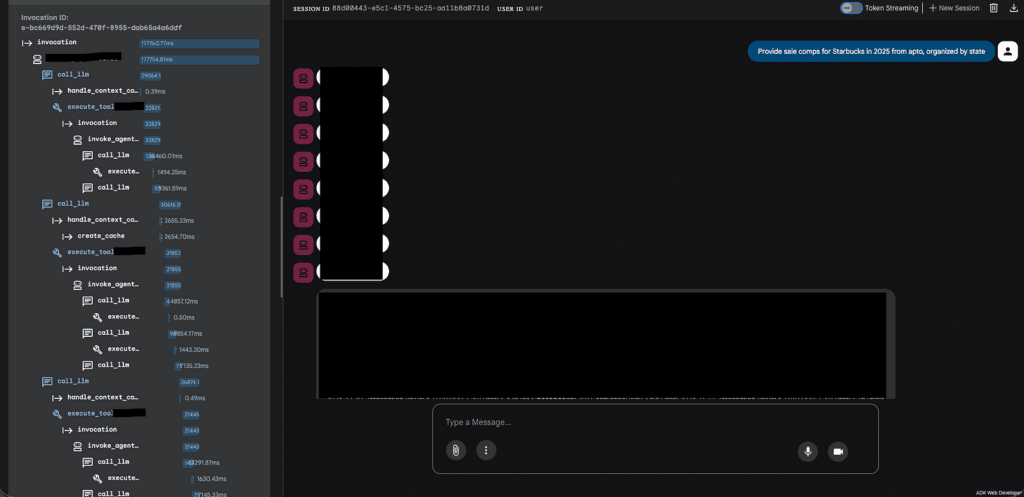
The above image illustrates the strategy for failed database tool executions. The agent tool call that is responsible for retrieving the required data through an SOQL query is shown spawning multiple invocations if the SOQL queries fail to retrieve the required data. Then the agent decides to broaden the SOQL query parameters up to three times through these instruction-driven strategies:
- Fuzzy matching: Use LIKE '%keyword%' instead of exact = comparisons
- Geographic OR clauses: Include both abbreviations and full names (e.g., 'CA' OR 'California')
- Retry up to 3 times: Reformulate the query if it returns no results or errors, assuming it was too restrictive
- Fall back to general queries: When the user's intent is unclear, run a broader query rather than asking for clarification
- Field discovery: Use apto_fields_all_search_tool with FIELDS(ALL) to explore actual data values before constructing a targeted query
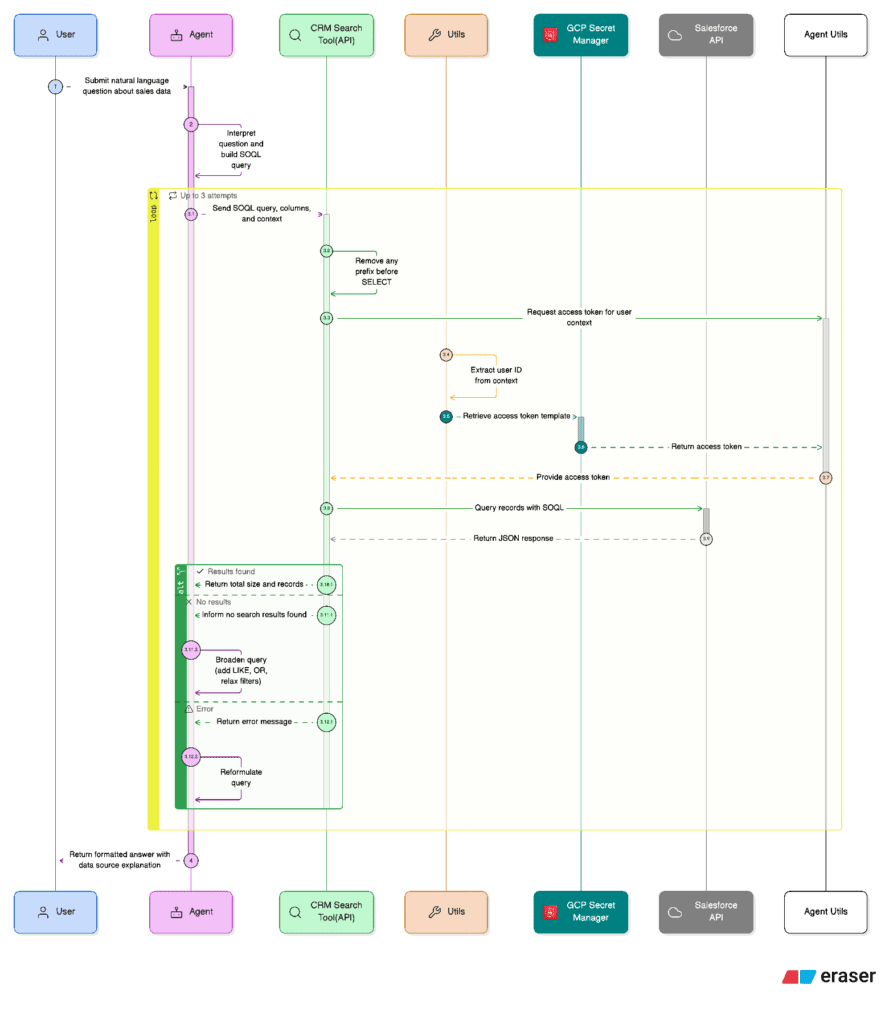
This design was efficient in retrieving the relevant rows of data from Salesforce and ensured output quality, but failed to deliver complex queries at an acceptable response speed.
Here are three modifications we made to the architecture and logic flow which collectively improved both these metrics.
a. Parallel Async Tool Calls
The single biggest latency win came from restructuring how the agent dispatches SOQL queries. Previously, the agent followed a sequential pattern: generate a query, execute it, evaluate the result, and if it failed, generate another query and try again. Each retry added a full round-trip of LLM reasoning + API call time.
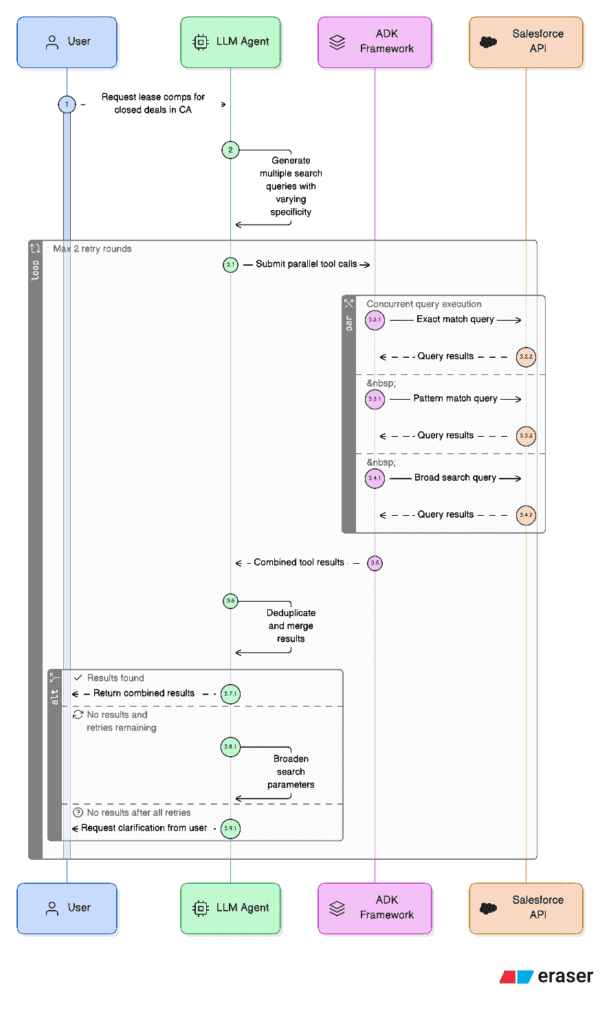
The redesigned approach exploits a native capability of Google ADK: when an LLM agent generates multiple tool calls in a single response, ADK executes all of them concurrently. We leveraged this by instructing the agent (via its system instructions) to always generate 2-3 alternative SOQL queries with different search strategies in its very first response, rather than issuing them one at a time.
The three query variations follow a deliberate spread of specificity:
- Exact/Specific Query: Strict field matching (e.g., WHERE address = '580 Moraga Rd')
- LIKE Pattern Query: Flexible fuzzy matching (e.g., WHERE address LIKE '%580 Moraga%')
- Broader Scope Query: Relaxed conditions or searches against related objects (e.g., querying Property__c instead of Lease__c)
On the tool implementation side, each apto_search_tool call is an async def function that uses aiohttp for non-blocking HTTP requests to the Salesforce REST API. This means ADK can fire all 2-3 tool calls concurrently and await them in parallel. The total wall-clock time equals the duration of the slowest single query, not the sum of all queries.
After results return, the agent combines and deduplicates records from all successful queries. If one query fails but others succeed, the successful results are used immediately without triggering a retry. A retry round (another batch of 2-3 parallel queries with even broader parameters) is only triggered if all queries in the first batch fail. The system caps this at two total rounds before falling back to a structured clarification request to the user.
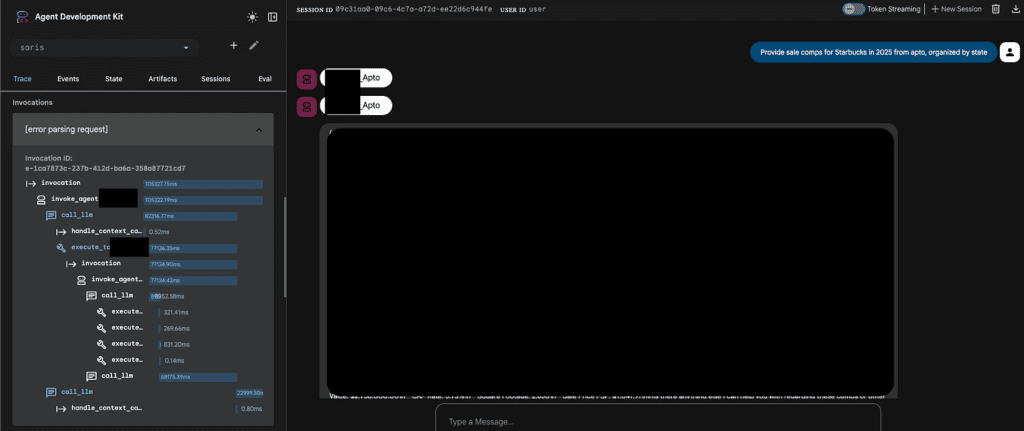
The net effect: what previously took 3-4 sequential LLM-call + API-call cycles for a complex query now resolves in 1-2 parallel rounds, cutting average response time by roughly 60-70% while simultaneously improving recall since different query strategies surface different matching records.
b. Structured Query Glossary
We observed that a significant portion of user queries in production fell into a small number of recurring categories. In every one of these cases, the agent was spending an LLM inference cycle generating SOQL from scratch, even though the query structure was identical every time. Only the parameters changed.
The tool glossary eliminates this overhead entirely. It is a predefined dictionary of query templates keyed by intent.
A dedicated apto_predefined_search_tool accepts just a query_key and an optional company_name. It looks up the matching template, safely escapes the fields to be passed into the SOQL string, and delegates directly to the existing apto_search_tool, bypassing the LLM's SOQL generation step entirely.
The agent instructions enforce a strict two-step priority:
- Step 1 (Glossary): Before generating any SOQL, check if the user's intent matches a predefined query key. If it does, call apto_predefined_search_tool with the key and parameter only.
- Step 2 (Custom SOQL): Only if no glossary entry matches, fall back to the full schema-aware SOQL generation path with parallel queries.
This is effectively a routing optimization. The LLM still decides which query to run, but for high-frequency intents it only needs to classify the intent and extract a parameter rather than compose an entire structured query. The result is deterministic, faster (one fewer LLM reasoning step), and cheaper (fewer input/output tokens consumed on query construction).
c. Bypass Final Output Generator LLM Call
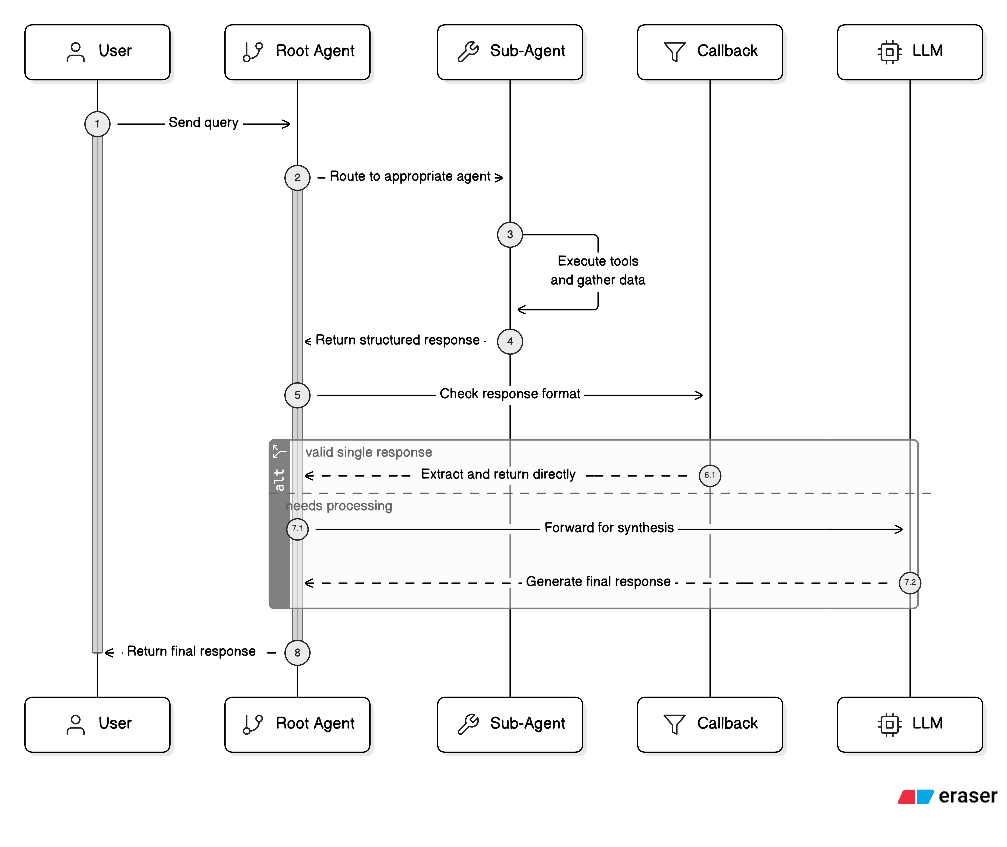
In a standard Google ADK multi-agent architecture, every sub-agent response flows back to the root (orchestrator) agent, which then makes one final LLM call to synthesize the sub-agent's output into the user-facing response format. In our case, this meant the root agent was receiving a fully formed, structured SubAgentOutput from Salesforce/Apto that already contained the formatted message, sources, and error fields, and then spending ~2-3 seconds on an LLM call that did little more than repackage that same data into the nearly identical Output schema.
We eliminated this redundancy with a before_model_callback on the root agent.
This callback intercepts the root agent's LLM request right before it fires. It inspects the conversation contents to check whether the last message is a function_response from one of the sub-agents. If exactly one sub-agent returned a valid SubAgentOutput JSON, the callback constructs the final output programmatically, mapping message, sources, and error directly, and returns it as a synthetic LlmResponse. ADK treats this returned value as the model's answer, so the actual LLM call never happens.
Critically, the callback includes safeguards:
- If no sub-agent response is found, it returns None (lets the LLM handle it normally)
- If multiple sub-agent responses are present, it returns None (synthesis across multiple sources still needs the LLM)
- If the response is malformed or missing the message field, it returns None
- If the conversation has a user message after the function response (a follow-up turn), it returns None
This means the bypass only activates on the straightforward single-sub-agent pass-through case, the exact scenario where the LLM adds no value.
However, we ultimately decided to not carry this implementation forward since we needed the response to follow other guardrails, client guidelines and system instructions which were enforced and rechecked by the final LLM call.
2. Upgrade to Google ADK 1.22+
One of our core applications was built on ADK 1.18 when it first went to production. While the framework was functional, we hit a recurring pain point that was eroding both reliability and user trust: Gemini models on Vertex AI would frequently produce malformed output structures during long-running agentic tasks. Instead of returning the structured JSON we defined via output_schema (Pydantic models like SubAgentOutput), the model would sometimes attempt to generate its own Python code to "compute" the answer, ignoring the tool-call / structured-output contract entirely. This manifested as raw code blocks in the response, missing fields, or JSON that didn't conform to the schema, all of which required brittle parsing workarounds on the backend.
This was a known limitation in how ADK 1.18 managed the interaction loop between the framework's tool-use orchestration and Gemini's native code-generation tendencies. The model would "escape" the agentic loop, especially on complex multi-turn queries where several tool calls and retries stretched the conversation context.
ADK 1.22 fixed this through several design changes:
Improved structured output enforcement: The framework's handling of output_schema and GenerateContentConfig became significantly more reliable at constraining Gemini's responses to valid JSON conforming to the declared Pydantic schema. Our sub-agents all declare output_schema=SubAgentOutput with disallow_transfer_to_parent=True and disallow_transfer_to_peers=True, and after the upgrade, these constraints were honored consistently.
Session database schema migration from Pickle to JSON: This was one of the most operationally impactful changes. ADK 1.18 used a Pickle-based serialization format (v0) for its internal session/metadata tables in the PostgreSQL database. ADK 1.22 moved to a JSON-based format (v1). This wasn't just an internal refactor. It had real consequences:
- Pickle is opaque: You can't query, debug, or inspect session state without deserializing Python objects. When sessions corrupted (which happened under high concurrency), recovery was essentially impossible.
- JSON is inspectable and portable: After migration, session state became directly queryable with standard SQL, making debugging production issues dramatically easier.
The migration itself required a dedicated script (migrate_sessions.py) that uses ADK's built-in adk migrate session CLI, connecting to the source (v0/Pickle) and destination (v1/JSON) databases via Cloud SQL Proxy.
If you're running on ADK < 1.22.1 with a PostgreSQL session store, this migration is not optional. Upgrading without running it will result in session deserialization failures.
Net impact: After the upgrade, we saw structured output conformance go from ~85% to effectively 100% on our Pydantic schemas, eliminated the class of "model tried to write code instead of calling tools" failures entirely, and gained the ability to debug session state with plain SQL queries instead of Python deserialization scripts.
3. Direct SQL Calls for Reads Instead of DatabaseSessionService
ADK provides DatabaseSessionService as the canonical interface for session data. Under the hood, it manages PostgreSQL tables: sessions (metadata) and events (every message and tool call as JSONB). The expected pattern is that your backend calls ADK's API, and ADK handles all data access.
We found this abstraction to be a bottleneck for every read operation. Loading a complete session object just to display a sidebar of session names was wasteful. Full-text search across conversations was impossible since DatabaseSessionService has no search API.
The split: We kept ADK's API for the two operations that require its orchestration: creating sessions and sending messages (where the agentic loop, tool execution, and event persistence must be coordinated). For everything else, the backend connects directly to the same PostgreSQL database with targeted SQL.
This works because ADK 1.22's JSON-based storage (see section 2) means the data is standard JSONB, queryable with native PostgreSQL operators like ->>, ->, and jsonb_array_elements. Session listing, conversation history, and search all became simple SQL queries against indexed tables.
We also extended ADK's schema with custom columns (name, naming_stage on the sessions table) and custom tables (file_metadata, event_attachments, message_feedback) that join against ADK's primary keys, giving us a richer data model without forking the framework.
Benefits:
- Latency: Direct SQL reads return in single-digit ms vs. 100-500ms through ADK's API (HTTP overhead + full session deserialization)
- Selectivity: Fetch only the columns and rows needed, not entire session objects
- Queryability: JSONB operators enable full-text search, author filtering, and content extraction that DatabaseSessionService doesn't expose
- Resilience: Read operations work even if the ADK Cloud Run service is temporarily down
The key insight: DatabaseSessionService is ADK's write coordinator, not your application's read layer. Treat the underlying PostgreSQL as a standard database for reads while respecting ADK's ownership of the write path.
4. ToolContext for State Management
In the early iterations of our ADK application, we followed what felt like the natural Python pattern for managing shared data: a global dictionary (or module-level variable) that tools would read from and write to. Each tool of a sub-agent would store its results in this shared dict.
This created three escalating problems:
Key collisions and silent overwrites. With multiple tools writing to the same flat namespace, a key like "results" or "token" was a collision waiting to happen. When we added new agents that all manage data from several types of document formats, the global dict became a minefield.
Stale state across sessions. Global dicts persist across requests in the same process. In a Cloud Run environment with concurrent requests, this was a security concern, not just a correctness issue.
Unbounded growth. Every tool call appended data to the same dictionary. This meant that the dict would accumulate a large amount of records and intermediate artifacts. Over a multi-turn conversation, especially one involving multiple operations such as an Excel extraction followed by a deck generation, this pain is blown up. All of this had to be serialized into all LLM request contexts, inflating token counts.
The fix: ADK's ToolContext provides a State dictionary that is scoped to the current session and managed by the framework. Each tool receives its own tool_context: ToolContext parameter, and reads/writes go through tool_context.state. We moved all shared data into this mechanism with namespaced keys. Each tool was made to operate within clear boundaries and supply its data only to requests that would require the context.
This also models framework-managed persistence: State is automatically serialized to the PostgreSQL session store. No manual save/load logic.
5. Event Compaction Tuning
Google ADK's EventsCompactionConfig controls how the framework manages context window growth over multi-turn conversations. As a session accumulates events (user messages, tool calls, tool responses, agent replies), all the history collected is passed to the LLM on every turn. Without compaction, a 20-turn conversation involving Excel uploads, data extraction, data collection, and PDF generation would balloon to tens of thousands of tokens of raw event history, most of which is redundant intermediate detail.
Event compaction works by summarizing older events into a condensed representation at a set interval using a dedicated LLM, keeping only a configurable overlap of recent unsummarized events for continuity.
Our initial configuration for an agent used compaction_interval=4 with gemini-2.5-flash-lite as the summarizer.
The problem with interval=4: This agent's conversations were dense with structured data. Compacting every 4 events meant the summarizer was frequently invoked mid-workflow, and each summarization risked lossy compression of structured data that the agent needed intact for the next tool call.
The problem with flash-lite as summarizer: The lite model produced summaries that were too aggressive in their compression. It would collapse "3 properties: Property A at $3.2M / 5.5% cap, Property B at $4.1M / 5.25% cap, Property C at $2.8M / 6.0% cap" into "3 properties were extracted with prices between $2.8M and $4.1M." The specific values were gone, exactly the ones the agent needed to maintain for artifact generation.
The fix: We increased the interval to compaction_interval=10 and upgraded the summarizer to gemini-2.5-flash. The longer interval meant that structured data stayed in raw form through the active workflow steps where it was needed most, and compaction only kicked in once the conversation moved past that working set. The more capable summarizer preserves structured detail (field names, specific values, table structures) in its summaries rather than flattening them into vague prose.
Some agents such as the main conversational agent can still use lower compaction intervals with flash-lite, which is appropriate for their shorter, lookup-oriented conversations. The key insight was that compaction settings aren't one-size-fits-all. They need to be tuned to the data density and workflow length of each agent.
6. Storing Uploaded Files as Artifacts, Not in Databases
Our initial file handling architecture followed a straightforward pattern earlier: when a user uploaded a file, the backend would store it in a GCS bucket at a structured path (users/{user_id}/sessions/{session_id}/files/{uuid}.ext), persist the metadata in PostgreSQL, and then generate a time-limited signed URL to pass the file content to the agent. This worked, but introduced several friction points specific to ADK's agentic AI workflow.
Issues with the Signed URLs approach:
Credential complexity for signing: Generating signed URLs on Cloud Run requires service account credentials with a private key. The default Compute Engine credentials do not store one, so there were two options: either store a JSON key in Secret Manager and fetch it at runtime, or use service credentials by refreshing base credentials, extracting the real service account email, creating impersonated_credentials.Credentials, and only then signing. This was a full authentication ritual for each file access.
URL expiration during long sessions: Signed URLs expire after a set period of time. In a multi-turn conversation where a user uploads an Excel file, discusses it over several messages, and then asks to regenerate the document hours later, the URL could expire. The agent would silently fail to access the file.
Agent doesn't need URLs: Agents operate within ADK framework's context. They do not create HTTP requests to download files. Passing them a signed URL means the backend has to download the file, encode it as base64 inlineData or fileData, and attach it to the message payload. The signed URL was just an intermediary hop that added latency and complexity.
The fix: ADK provides a great ArtifactService abstraction with two backends: InMemoryArtifactService for local development and GCS-backed storage for production (configured via artifact_service_uri). The artifact service handles storage and retrieval transparently. Tools just reference files by name within the session scope.
The before_model_callback intercepts file uploads before they reach Gemini, saves them as artifacts, and replaces the binary content with a text placeholder. When the agent later needs the data, it loads the artifact by name and extracts the structured content.
Benefits:
- No URL expiration. Artifacts are referenced by session-scoped filename, not by time-limited URL. A file uploaded in turn 1 is accessible in turn 50.
- Versioning built in. save_artifact returns a version number. Re-uploading a corrected spreadsheet creates a new version automatically.
- Environment parity. InMemoryArtifactService in development, GCS in production. Same API, zero code changes.
The GCS + signed URL path still exists for the frontend-facing download flow (conversation history, file previews), where the browser genuinely needs an HTTPS URL. The distinction is: artifacts for agent-side access, signed URLs for user-side access.
7. Enforcing Structured Output with output_schema and output_key
One of the more subtle failure modes in agentic AI applications is not the agent failing to answer. It's the agent answering in the wrong shape. A frontend expecting a certain format such as {"message": "...", "sources": [...], "error": ""} receives a free-text paragraph instead. A downstream tool expecting a JSON object with specific field names gets a Markdown table. The agent "did the job" but the system had to report a technical issue.
We encountered this constantly before we standardized on ADK's built-in schema enforcement. Our sub-agents would sometimes return valid answers wrapped in conversational preamble ("Sure! Here's what I found:"), or nest the JSON inside a Markdown code block, or omit optional fields entirely. All of which required explicit brittle regex formatting and try/except parsing on the backend.
The fix: ADK's LlmAgent provides three parameters that collectively solve this:
output_schema: A Pydantic BaseModel (in Python) defines the exact JSON structure the agent must return.
output_key: A string key under which the agent's final text response is automatically saved to session.state. This eliminates manual state-writing logic and makes the result immediately available to downstream agents or to the orchestrator.
input_schema: Defines the expected structure for the user's input. When set, the agent expects a JSON string conforming to this schema, making the contract explicit in both directions.
In our implementation, every sub-agent declares an output_schema. The disallow_transfer_to_parent and disallow_transfer_to_peers flags are required when using output_schema. They ensure that the sub-agent returns structured response directly to the parent process rather than attempting to transfer control, which would bypass the schema enforcement.
The root agent follows the same pattern with its own output schema, creating a typed contract at every boundary in the multi-agent system.
Benefits:
- Deterministic response shape. The frontend never receives malformed JSON. Parsing is a single json.loads() call, not a regex pipeline.
- Automatic state propagation. output_key writes the result to session state without manual tool_context.state assignments, making it immediately available to the passthrough callback (section 1c) and to other agents.
- Explicit contracts. The Pydantic model serves as living documentation of what each agent returns. A new developer can read SubAgentOutput and know exactly what fields to expect. No need to trace through conversation logs.
- Validation at the framework level. Schema violations are caught by ADK before the response reaches your application code, eliminating an entire class of runtime parsing errors.
What's Next
These seven practices came from shipping real AI-powered applications on Google ADK, not from reading the docs. Each one solved a specific pain point we hit in production, and together they represent the kind of framework maturity that only comes from sustained iteration on live systems.
If your team is exploring agentic AI and wants to skip the learning curve, HatchWorks AI has been building with ADK since v1.0 and with Generative Driven Development as our core methodology for AI-native delivery.