The ultimate comparison for developers, product teams, and AI-led organizations (especially those with varying technical skills).
Zapier and n8n are two of the most widely used tools for connecting apps and automating tasks, but they serve different users, cater to different use cases, and fundamentally differ in their philosophies, especially in terms of the number of integrations.
In this article, we put the two head-to-head to see which one you should invest your time in.
It’s n8n vs Zapier. Let’s see who wins.
What is a workflow in n8n?
N8n defines it as: “a collection of nodes that automate a process. Workflows begin execution when a trigger condition occurs and execute sequentially to achieve complex tasks.”
What Are n8n and Zapier? A Quick Primer
Let this section serve as a brief overview of both tools, where you can get snippet information about what each does and who they are for. The rest of the article will go deeper into the specifics.
Zapier: The Mainstream Standard for No-Code Automation
Zapier is a commercial, cloud-based automation platform.
It allows users to create workflows (called “Zaps”) that connect over 8,000 apps through a simple, no-code interface. It’s optimized for accessibility, making it a favorite for non-technical teams who want to automate repetitive tasks without developer involvement.
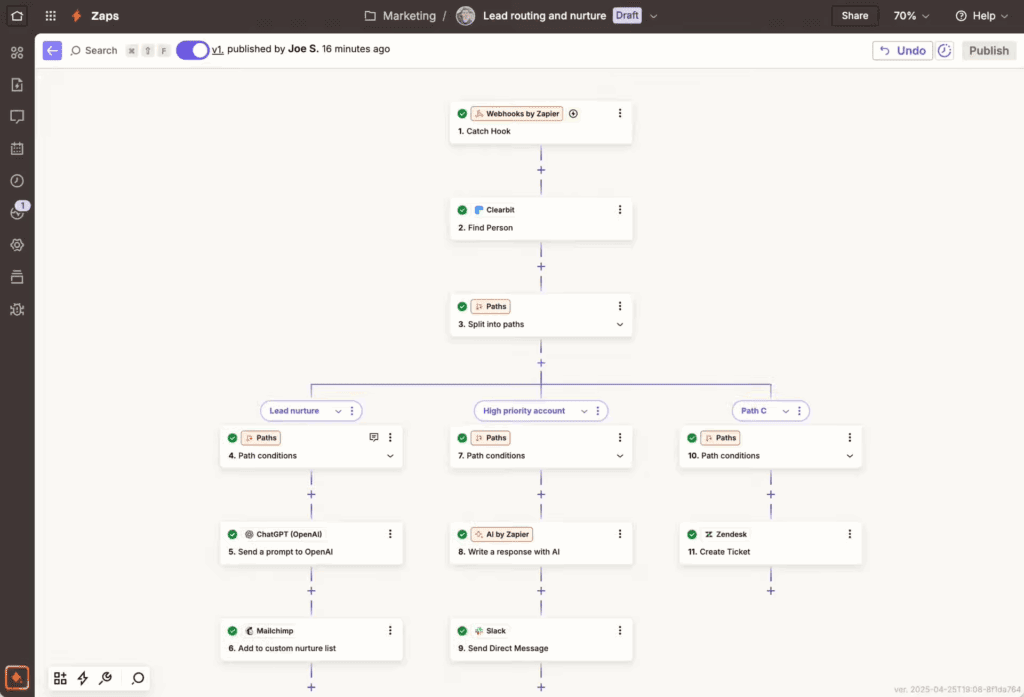
Zapier’s strength lies in speed and ease with pre-built integrations, ready-to-use templates, and a clean UI that works out of the box. It is well-suited for marketing operations, business teams, and startups looking to automate processes without building or hosting any infrastructure themselves.
Zapier is best for citizen developers and business teams who value fast setup and broad SaaS coverage over deep customization and infrastructure control.
n8n: The Developer-First Engine for Custom Workflows
n8n is a workflow automation platform built for flexibility and for teams that want control over where and how automations run. While its source code is publicly available under n8n’s Sustainable Use License (a fair-code model), it’s not “open source” in the OSI sense and includes commercial-use restrictions. Unlike Zapier, n8n can be self-hosted, inspected, and extended, making it a strong fit for custom, developer-owned workflows and data environments.
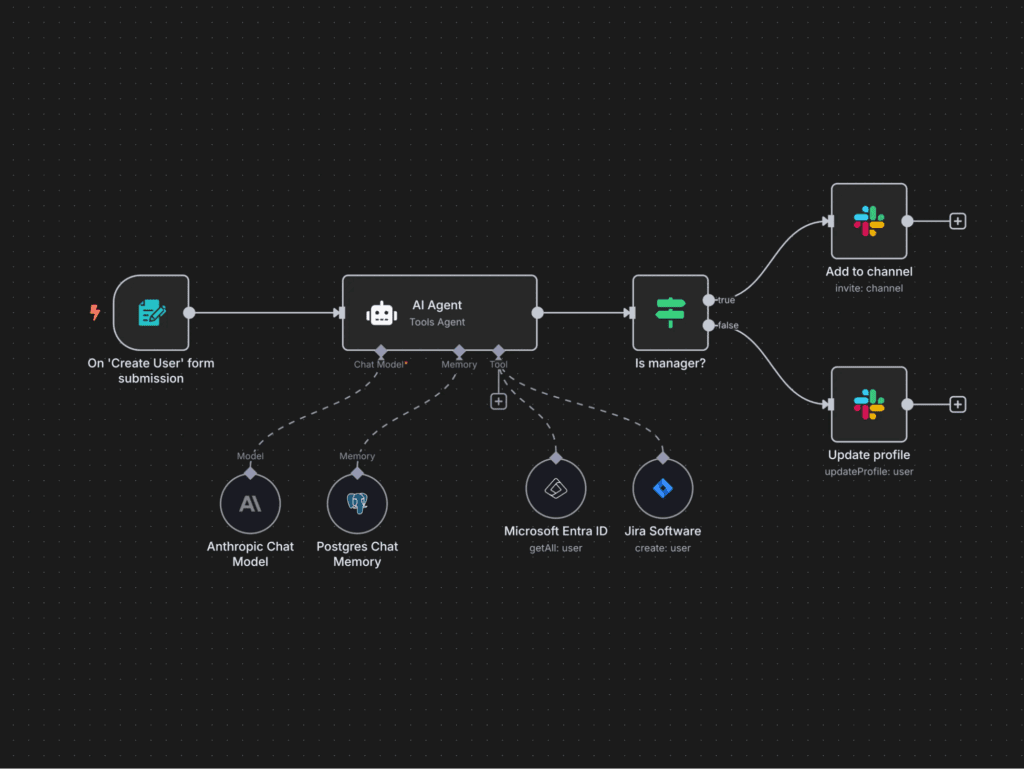
It supports complex logic, JavaScript-based custom nodes, and integrations with any API, even those not natively supported, via its HTTP Request and Webhook nodes. This makes n8n especially valuable in environments where automation needs to go beyond simple “trigger → action” logic or where AI agents and orchestration layers play a larger role.
n8n is ideal for engineering teams, AI-driven development environments, and enterprises that need control, flexibility, and advanced orchestration. Teams can choose to run it on their own servers, manage how data is stored, and shape how structured data flows through their automations.
If you’re looking for a foundational overview of n8n’s capabilities, explore our full n8n guide.
n8n vs Zapier: A Comparative Analysis of Features
While both Zapier and n8n help teams connect apps and automate workflows, they serve different priorities, and that shapes everything from workflow creation to how far they can scale.
The table below offers a snapshot of how these platforms compare across key areas. In the sections that follow, we break down each category.
| Feature Category | Zapier | n8n |
|---|---|---|
|
Ease of Use
|
✅ Extremely user-friendly for non-devs
|
⚠️ Steeper learning curve, dev-oriented
|
|
Integration Library
|
✅ 8,000+ prebuilt SaaS connectors
|
⚠️ ~400 nodes, but API-first flexibility
|
|
Workflow Complexity
|
⚠️ Best for linear flows and basic logic
|
✅ Built for branching, loops, error handling
|
|
Customization & Extensibility
|
⚠️ Limited custom code and platform control
|
✅ Full JS scripting, custom nodes, plugins
|
|
Hosting Options
|
❌ Cloud-only
|
✅ Self-host, cloud, hybrid options
|
|
Security & Compliance Fit
|
⚠️ Vendor-managed data flow
|
✅ Enterprise control over infrastructure
|
|
AI Workflow Capabilities
|
⚠️ Prompt-in/prompt-out only
|
✅ Full agent orchestration, RAG, LangChain
|
|
Best Fit For
|
No-code teams, SaaS automation, fast setup
|
Developers, AI teams, regulated industries
|
Integrations & Connector Ecosystem
n8n and Zapier both connect apps and automate workflows, but their approach to integrations is shaped by very different priorities.
Where they overlap vs differ (at a glance):
| Capability | Zapier | n8n |
|---|---|---|
|
Native App Integrations
|
~8,000 apps
|
~400 nodes
|
|
Visual Integration Builder
|
✅
|
✅
|
|
Custom API Support
|
Limited
|
Full API control via HTTP node
|
|
Integration Extensibility
|
JS code step (basic)
|
Custom modules, reusable nodes
|
|
Best Fit For
|
SaaS-heavy workflows, BizOps
|
Custom systems, developer teams
|
For non-technical teams, Zapier is easier to navigate out of the box. For technical teams solving non-standard problems, n8n offers the open-ended flexibility most commercial platforms can’t match.
Let’s look at why this is the case.
Zapier: Breadth and Speed
Zapier has one of the largest integration libraries in the automation space. It boasts over 8,000 pre-built app connections.
For most standard SaaS tools, from CRMs and marketing platforms to spreadsheets and calendars, there’s already a plug-and-play connector. This is one of Zapier’s biggest strengths, as users can get up and running fast without writing a line of code or reading an API doc.
This ease of use is particularly helpful for teams without technical knowledge, allowing them to quickly extract data, trigger workflows, and automate everyday tasks.
But scale comes with limitations, and Zapier’s model prioritizes ease over extensibility. You’re confined to the actions and triggers predefined by Zapier’s team or app developers. If a specific API operation isn’t exposed, your options are limited to workarounds or their relatively constrained custom code step.
n8n: Flexibility Over Sheer Count
n8n takes a different path. While it offers fewer native “nodes” (about 400+), it’s designed for flexibility first. Any service with an API can be integrated using its HTTP Request or Webhook nodes, giving developers full control over the shape, logic, and data transformations in their automation workflows.
That makes n8n far more adaptable in complex environments where AI technologies, internal tools, or systems with large data volumes need to be orchestrated. It’s especially powerful for teams building with APIs that require authentication, state management, or custom logic layers.
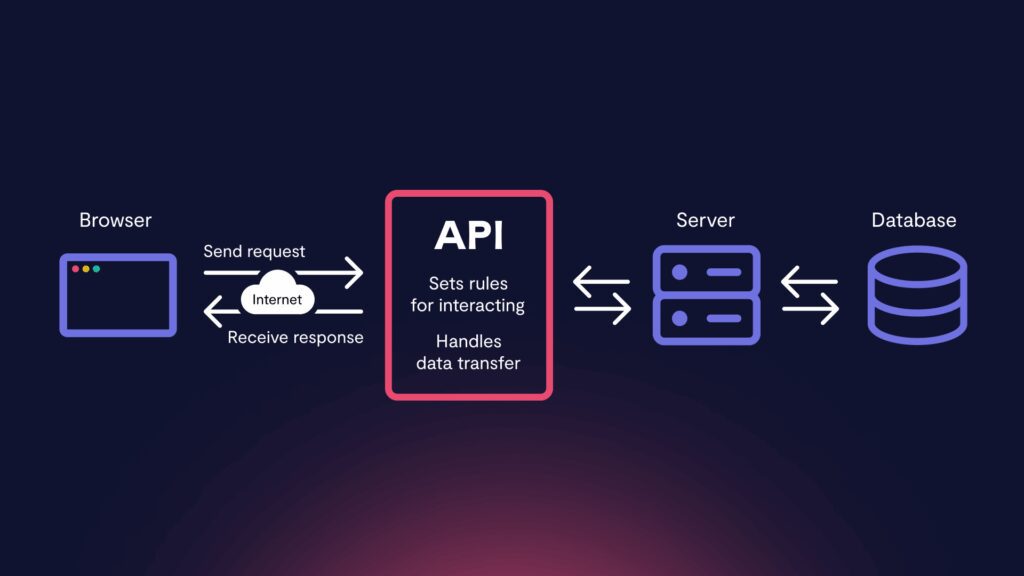
That makes n8n far more adaptable in complex environments where:
- Internal tools or bespoke backends dominate
- AI services, vector databases, or proprietary LLMs need orchestration
- Large or messy data flows need custom handling or edge-case data services exist
It’s particularly useful when building with AI or orchestrating workflows across evolving or undocumented systems.
Workflow Logic & Complexity
How workflows are constructed and how much logic they can handle are major differentiators between Zapier and n8n.
Zapier favors simplicity. n8n is built for depth.
Zapier’s workflow model is designed around a single trigger followed by one or more linear actions. You can add conditions, filters, delays, and even a bit of branching, but only within limits. Logic must be simple enough to remain visual and accessible to non-developers.
For basic use cases, that’s a feature, not a flaw. But once complexity grows, say if there are multiple conditionals, loops, retries, or parallel branches, Zapier starts to feel restrictive.
n8n, by contrast, is built for complex workflows from the start.
It supports nested flows, branching logic, parallel execution, looping, error handling, and modular sub-flows. For advanced users, this unlocks a level of orchestration that behaves more like a back-end service than a front-end tool.
You’re not constrained by the interface and you control the logic. That makes it a much stronger option for developer-led teams building robust, reusable automations, or orchestrating AI agents across multiple tools.
And when things go wrong? n8n’s visual editor and debugging tools offer granular visibility into every node’s input/output and execution state, making troubleshooting more technical, but also more powerful.
Here’s how their workflow logic and complexity compare:
| Capability | Zapier | n8n |
|---|---|---|
|
Workflow Structure
|
Linear with basic branches
|
Fully modular, multi-path
|
|
Looping Support
|
Limited
|
Native
|
|
Parallel Execution
|
Indirect/workarounds
|
Built-in
|
|
Error Handling
|
Basic try/catch
|
Granular error hooks
|
|
Reusable Components
|
Limited
|
Sub-workflows, callable nodes
|
Extensibility (APIs, custom code, plugins)
Extensibility defines how well an automation platform adapts to evolving systems, integrations, and development needs. While both Zapier and n8n offer ways to go beyond pre-built functionality, they serve very different levels of technical depth.
| Capability | Zapier | n8n |
|---|---|---|
|
Custom Code Support
|
Basic JS step
|
Full JS logic & modules
|
|
Reusable Logic
|
Limited
|
Custom nodes, callable workflows
|
|
API Integration
|
Webhooks, limited fetch
|
Full HTTP control, headers, auth
|
|
Platform Extensibility
|
CLI + Platform UI
|
Self-hostable, source-extensible
|
|
Developer Workflow Fit
|
Minimal
|
IDE-friendly, versionable, modular
|
Zapier includes a lightweight JavaScript code step designed for formatting or logic tweaks. While useful for small jobs, it operates within strict execution limits and lacks support for modular development.
Its CLI allows private app development, but there’s no plugin ecosystem or way to deeply alter Zapier interfaces beyond surface-level configurations.
n8n, on the other hand, is architected for flexibility. Its JavaScript node supports full logic execution, access to environment variables, external services, and modular scripting.
Developers can also build custom reusable nodes or extend the platform with plugins.
When self-hosted, n8n integrates directly into your infrastructure. That supports secrets management, environment-based configuration, and CI/CD workflows. It’s structured to behave like part of your stack rather than a tool adjacent to it.
These advanced features and extensibility are a core requirement for teams building multi-agent AI systems, backend automations, or workflows where precision and performance matter.
Templates, Ecosystem & Community Support
The strength of a platform’s ecosystem can significantly influence adoption speed, problem-solving efficiency, and long-term sustainability. While both Zapier and n8n maintain active communities and resource hubs, the character of each ecosystem reflects its core audiences.
| Capability | Zapier | n8n |
|---|---|---|
|
Template Library
|
Extensive, no-code focused
|
Moderate, developer-led
|
|
Community Channels
|
Docs, help center, forums
|
GitHub, Discord, Discourse
|
|
Node/Plugin Publishing
|
Private apps only
|
Open publishing + custom nodes
|
|
Ecosystem Fit
|
Business automation at scale
|
Developer innovation + control
|
Zapier’s template library is extensive. It offers thousands of pre-built workflows organized by app, use case, and role.
For non-technical users, this reduces friction. Many automations can be launched without configuring a single variable. Zapier also invests heavily in documentation, help articles, and guided tutorials aimed at business users.
The ecosystem around Zapier is mature and commercial-friendly, but developer engagement is limited. There’s no significant plugin architecture or third-party extension marketplace beyond its private app model.
n8n’s ecosystem is smaller but more technically oriented.
The community, which is active on GitHub, Discord, and Discourse, contributes new nodes, templates, and integrations regularly. Developers can publish their own custom nodes or fork the platform itself for specialized use cases.
There’s a growing set of examples, workflows, and documentation tailored toward more advanced or niche applications, especially in areas like AI orchestration and internal tooling.
While Zapier’s ecosystem lowers the barrier to entry, n8n’s ecosystem encourages contribution, customization, and long-term developer ownership. Teams prioritizing fast starts and standardized tools will benefit from Zapier’s polished template library, help center, and community forums.
Those looking to iterate, extend, and co-develop with a technical community will find more depth in n8n’s workflow templates, documentation, and active developer spaces like GitHub, Discord, and Discourse.
AI Readiness and Automation Scope
As more teams build automation around LLMs, embeddings, and retrieval-augmented generation (RAG), the ability to orchestrate AI workflows has become a deciding factor.
And it’s an area where n8n and Zapier diverge. Only one is optimized for true advanced AI capabilities, and it’s n8n.
Zapier offers a GPT-3/4 integration via its OpenAI app, allowing users to insert AI steps into workflows with minimal configuration. It’s functional for tasks like generating text, classifying responses, or summarizing inputs, but it’s limited to prompt → output interactions.
There’s no built-in memory, chaining, context management, or agentic behavior. For basic enhancements, like adding AI to customer support or email composition, it’s accessible and easy to use.
n8n is more AI-native in its architecture. It supports LangChain, custom vector database integrations, and advanced prompt orchestration. Below you can see an image borrowed from the n8n blog where they show an example of a LangChain agent running an n8n workflow:

Developers can create multi-step workflows that pass context between steps, implement tool usage via APIs, and manage memory through embeddings or stateful design. This makes it a natural fit for Retrieval-Augmented Generation (RAG) pipelines, AI agent orchestration, and hybrid human-in-the-loop flows.
It’s also open to rapid experimentation. You can test prompts, chain models, and branch workflows dynamically without waiting for feature rollouts or hitting platform constraints.
| Capability | Zapier | n8n |
|---|---|---|
|
Large Language Model Integration
|
OpenAI plugin
|
OpenAI, LangChain, Claude, others
|
|
RAG/Memory Support
|
Not supported
|
Full control via logic + DBs
|
|
Agent Workflow Orchestration
|
❌
|
✅ Supports multi-agent flows
|
|
Prompt Engineering Support
|
Basic
|
Dynamic, reusable, chainable
|
|
Best Fit For
|
Basic AI enhancements
|
Advanced LLM workflows, GenAI teams
|
For teams exploring AI use cases beyond single prompts, n8n offers the depth and flexibility needed to do it right.
Want to go deeper? See our breakdown on n8n AI agents.
Hosting, Security & Data Privacy Considerations
Where your automation runs, and who controls that environment, has direct implications for compliance, security, and architectural fit.
This is one of the most meaningful structural differences between Zapier and n8n. And in our eyes, n8n has the advantage. Let’s look at why and where Zapier trades off simplicity for security.
n8n’s Self-Hosting Advantage
n8n gives you complete control over deployment. It can be self-hosted on-premises or within a private cloud, enabling teams to meet strict compliance standards like GDPR, HIPAA, or SOC 2 without relying on third-party infrastructure.
This makes it a strong choice for organizations with data privacy concerns or internal governance mandates.
Teams can integrate n8n into their DevOps workflows, secure it behind firewalls, manage authentication through existing systems, and enforce internal data policies.
Zapier’s Security Tradeoffs
Zapier is fully cloud-managed, with no option to self-host or isolate data processing. This simplifies onboarding and reduces operational overhead, especially for small teams or early-stage startups. But it also introduces limitations for businesses with strict security or compliance standards.
All workflow data is processed through Zapier’s infrastructure, including data stored in logs, histories, and payloads. That data remains within Zapier’s cloud, outside your direct control.
For teams handling PII, financial records, healthcare data, or any sensitive IP, that’s often a blocker. If your organization prioritizes data sovereignty, vendor risk mitigation, or infrastructure control, Zapier’s convenience may come at too high a cost.
n8n vs Zapier: Pricing Models (2025 Snapshot)
Zapier and n8n follow very different pricing models, and the differences matter more as automation becomes core infrastructure. Please note that these figures and models are accurate as of November 2025. We will update them periodically to reflect changes that may occur.
Zapier’s Task-Based Billing
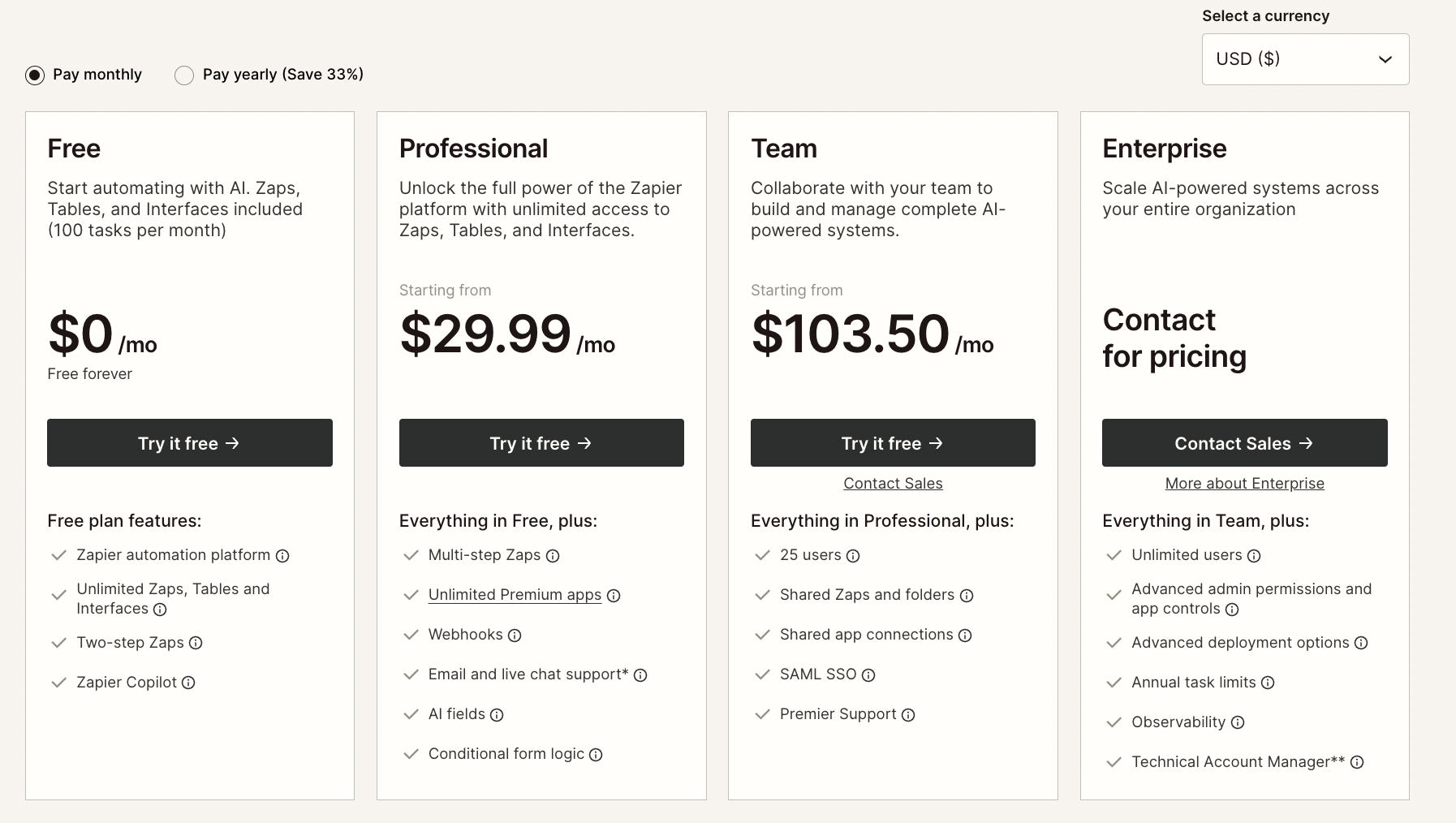
Zapier charges based on “tasks” where each action or step in a workflow counts as one task, even if it’s a simple filter or formatter.
The free tier offers limited monthly usage but most teams quickly outgrow it and move into tiered pricing that scales with volume.
The catch? Workflows that branch, loop, or call multiple APIs can consume tasks rapidly. So, what starts as an affordable tool can become surprisingly expensive as complexity or volume increases.
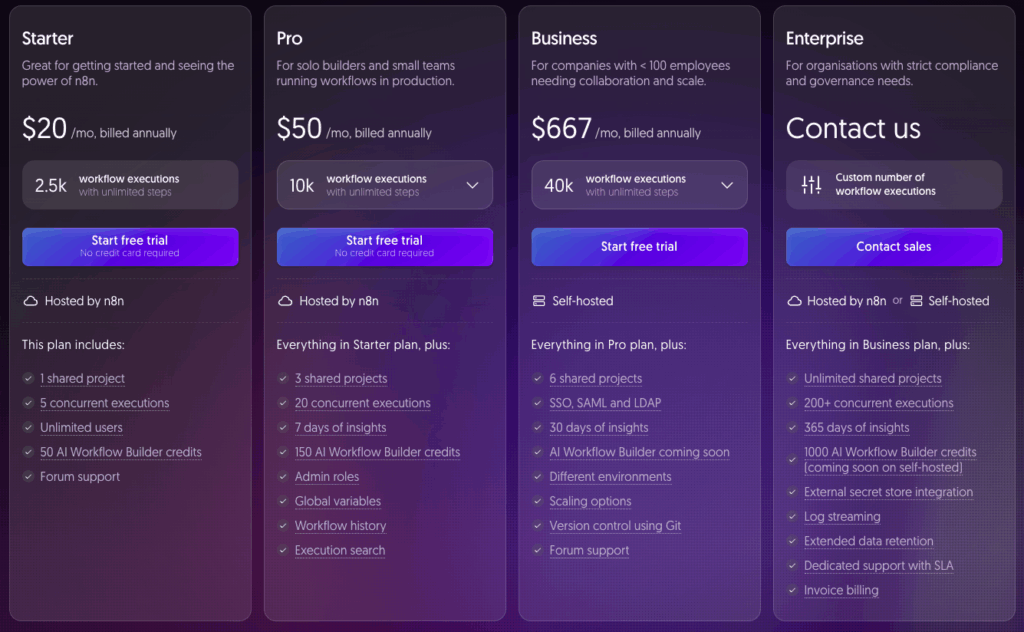
n8n’s Execution-Based Pricing
n8n bills based on workflow execution, not individual steps. This means that no matter how complex or branched your workflow is, each run counts as a single execution. For high-volume or logic-heavy use cases, this often results in more predictable, lower costs.
n8n can also be self-hosted under its Sustainable Use License (a fair-code, source-available license). You can use and modify it for internal business purposes without an open-source license, but there are restrictions, especially around providing it to others or offering it as a hosted service.
The managed cloud version is paid, but still maintains flat execution-based pricing tiers.
Use Cases in the Wild: What Real Teams Are Automating
Both Zapier and n8n power real-world automation, but their strengths show up in different types of work. Here’s what teams are actually building, and where each platform shines.
Zapier‑Powered Workflows
Zapier is best for automating common SaaS tasks with minimal setup and no developer involvement.
Common automations include:
- Marketing ops: Form → CRM → Slack → Email
- E-commerce: Order → Inventory update → Finance report
- Internal alerts: Calendar → Slack or Teams reminders
- Content workflows: Blog draft → AI summary → CMS publish
Zapier’s real-world example: Vendasta
Vendasta, a SaaS company supporting resellers and agencies, used Zapier to overhaul their lead enrichment and follow-up pipeline. By chaining together tools like Typeform, Clearbit, HubSpot, and Slack, they created a zero-touch flow from form submission to personalized outreach.
This resulted in over $1 million in reclaimed revenue and 282 workdays saved per year, without hiring additional ops staff.

Zapier’s real-world example: SisterLove
SisterLove, a nonprofit focused on reproductive justice, paired Zapier with OpenAI to automate content creation across channels.
The flow: internal notes → AI-generated blog → automated formatting → scheduled emails and SMS.
The result was over 190 hours saved in nine months, enabling a small team to punch above its weight in outreach and advocacy.
n8n for Advanced Automations
n8n is best for complex automations, custom system integration, and full control over infrastructure and execution.
Common automations include:
- AI orchestration: Multi-agent LLM pipelines with memory
- Web scraping + enrichment: Public data → Slack → Airtable
- Internal reporting: API calls → database → PDF → email
- Custom bots: Slack commands that trigger internal logic
n8n’s real-world example: Kunai
Kunai, a fintech consultancy, faced a 12-week timeline to rebuild a recruiting workflow after switching ATS platforms. Instead of coding it from scratch, they implemented n8n in two days.
By chaining APIs and internal tools through a self-hosted instance, they cut over 300 hours of engineering time, which kept the team focused on client delivery instead of backend duct tape.

n8n’s real-world example: Delivery Hero
Delivery Hero adopted n8n to streamline internal IT operations. Running it on their own infrastructure allowed them to automate cross-platform support workflows, integrating custom scripts, internal APIs, and messaging tools.
The outcome was 200+ hours saved per month, full auditability, and zero vendor lock-in.
Which Tool Wins in Which Scenario? A Quick n8n vs Zapier Decision Matrix
If you’re choosing between n8n and Zapier, context is everything. Both tools are powerful but they’re optimized for different kinds of teams, workflows, and scaling strategies.
Use this matrix as a fast way to align platform strengths with your project priorities:
| Best Tool | Why | |
|---|---|---|
|
You need to automate common SaaS tools with minimal effort
|
Zapier
|
Thousands of plug-and-play integrations, no code required
|
|
Your workflows involve complex logic, branching, or looping
|
n8n
|
Full control over logic paths, error handling, and conditional flows
|
|
You’re building multi-step LLM workflows or AI agents
|
n8n
|
Supports LangChain, memory, chaining, and custom RAG pipelines
|
|
Your data is sensitive or regulated (e.g., PII, HIPAA)
|
n8n
|
Can be self-hosted to meet internal compliance and data sovereignty standards
|
|
You want to automate without writing or maintaining code
|
Zapier
|
Built for non-technical users, great docs and templates
|
|
You need to integrate with internal tools or proprietary systems
|
n8n
|
Full API control, custom HTTP nodes, reusable modules
|
|
You need to move fast with limited dev time or buy-in
|
Zapier
|
Low-friction SaaS model with ready-to-go workflows
|
|
You’re optimizing for long-term scalability and flexibility
|
n8n
|
Source-available under a fair-code license, self-hostable, and extensible for developer-owned automation.
|
About HatchWorks: Your AI Automation Partner
HatchWorks AI helps teams design and build intelligent workflows that scale faster, smarter, and with measurable impact.
We specialize in automation solutions powered by large language models (LLMs), retrieval augmented generation (RAG), and deep API integrations across modern and legacy systems.
Whether you’re orchestrating internal tools, deploying AI agents, or integrating n8n into your cloud infrastructure, we bring a practical, engineering-first approach.
Our expertise goes beyond setting up workflows; we help define the right use cases, architect for security and scale, and align automation with your broader digital strategy.
So, if you’re exploring how to move from basic triggers to true AI-powered orchestration, our Gen AI services can help you get there.