If you have tried a single AI agent inside a workflow, you already know the feeling.
It is powerful for simple tasks, then it hits a ceiling. One chatbot with all the tools and all the logic becomes hard to trust, hard to debug, and hard to scale.
Multi agent solutions in n8n are how we move past that ceiling.
Instead of one generalist agent doing everything, we use multiple AI agents inside visual workflows. Each agent has a clear job and a focused tool set, and n8n coordinates how they work together.
The result is AI workflows that handle real-world applications such as customer support, scheduling, and internal business processes, while still staying understandable for humans.
In this article, we’ll walk through how that works in n8n, from core components and node types to concrete examples and an implementation checklist.
Multiple AI agents, Real AI Workflows, Real World Applications
When we talk about multi agent solutions in n8n, we mean AI systems where:
- Several AI agents run inside the same set of workflows.
- Every agent owns one main job, for example, handling orders, interpreting policies, doing QA, or managing schedules.
- n8n ties everything together, providing the platform, node types, and workflow automation that let those agents share tools and data.
At a high level, you will see the same pattern:
- A trigger node, such as a chat trigger or webhook, receives the initial message or event.
- An agent node defines an AI agent with a system prompt, model, tools, and memory.
- Tools are exposed through nodes such as HTTP Request, Code, database nodes, or other agents via the AI Agent Tool node.
- Workflow execution moves from node to node and logs data, outputs, and errors so that teams can monitor and scale.
We will use two anchor examples: a multi agent email support workflow and a personal productivity assistant that manages email, tasks, and calendar.
TL;DR: How a Multi Agent System Runs End-to-End in One n8n Workflow
Imagine one workflow that handles all of the following.
- Input
A webhook or chat trigger receives a message from a user. This could be an email body, a support request, or a natural language instruction. - Classification and routing
An AI node or classifier predicts the category, for example, order status, policy question, billing, or something else. A Switch node then routes the workflow execution into the right path. - Multi agent orchestration
In a routing pattern, each path calls a sub workflow with its own agent node and tools. In an orchestrator pattern, a primary agent uses the AI Agent Tool node to call other agents as tools, which is the core of multi agent orchestration. - Action and output
Agents call tools such as APIs, databases, code nodes, and Google Drive. They return structured responses that downstream nodes turn into drafts, tickets, records, or analytics.
If you remember only this section, remember that n8n handles workflow, data, and tools, while multi agent systems define how several AI agents cooperate inside that structure.
What an AI Agent Is, What Tools Are, and Where Multiple Agents Shine
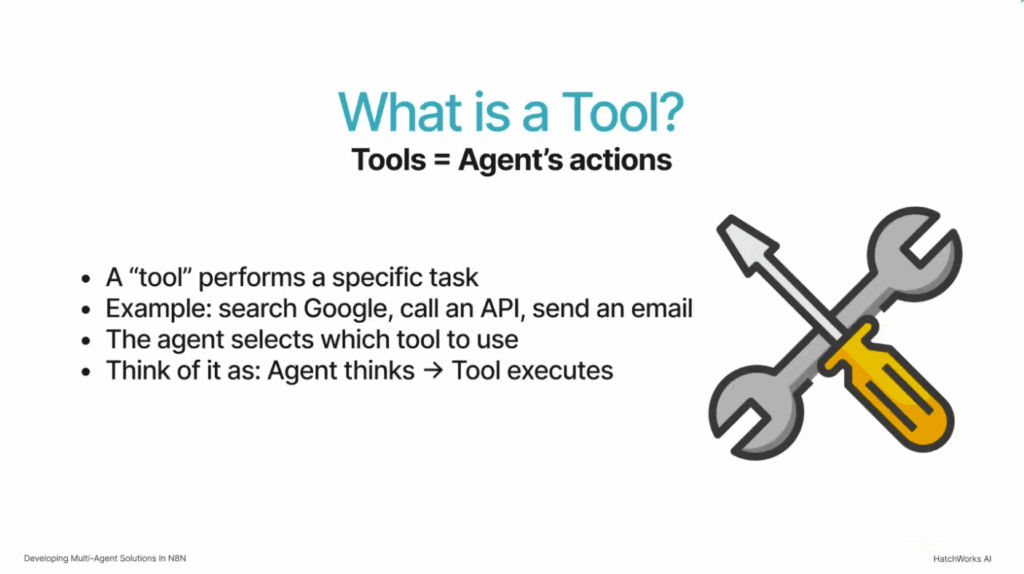
Inside n8n, an AI agent is a configurable unit that:
- Receives input such as text, JSON, or structured records.
- Uses a model and a system prompt to reason about what to do.
- Calls tools to act and returns a structured response to the workflow.

A tool is anything the agent can call through a node:
- HTTP Request nodes for API calls.
- Code nodes or custom nodes for writing code and implementing complex logic.
- Database nodes that read and write data.
- The AI Agent Tool node that lets one agent call other agents or sub-workflows as tools.
A single agent is perfect for simple automations such as summarizing a document or answering one question.
Multiple agents help when:
- The workflow touches several systems such as ERP, CRM, policy documents, calendars, and task managers.
- You want to separate reasoning, business rules, and quality checks.
- You need AI workflows that remain understandable and maintainable for teams.
Need a deeper dive into AI agents in n8n?
For a full breakdown of models, tools, prompts, and patterns inside the AI Agent node, see n8n AI Agent Guide: What You Are Still Missing in Existing Tutorials.
Node Level View of a Simple Multi Agent Workflow Execution
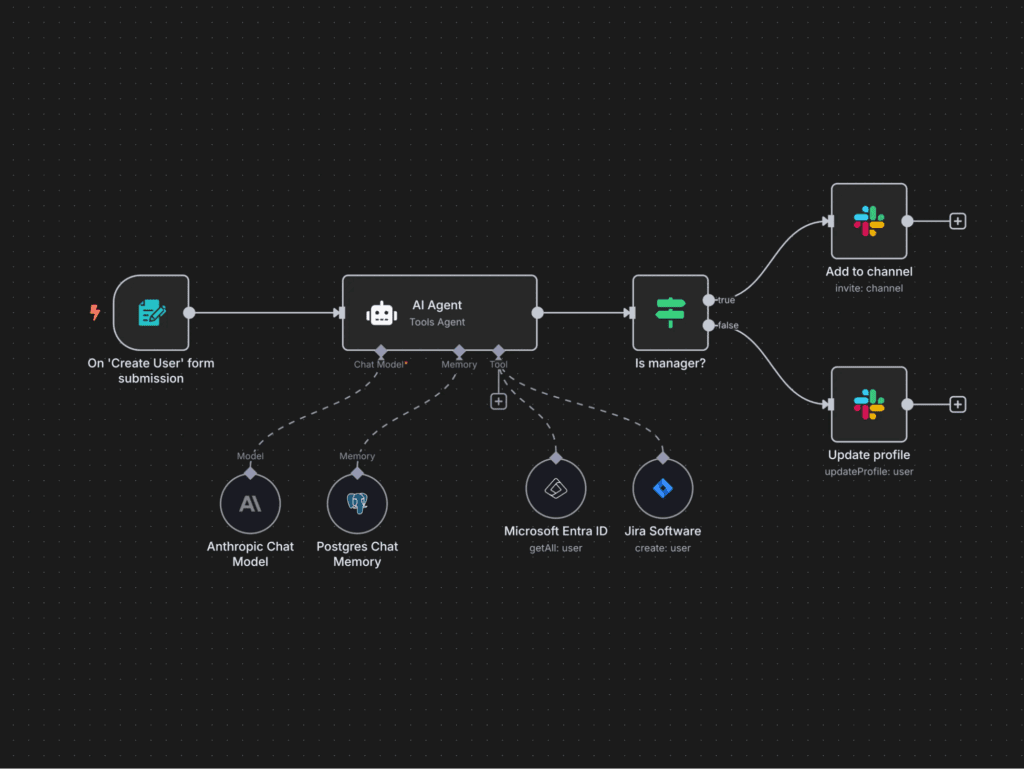
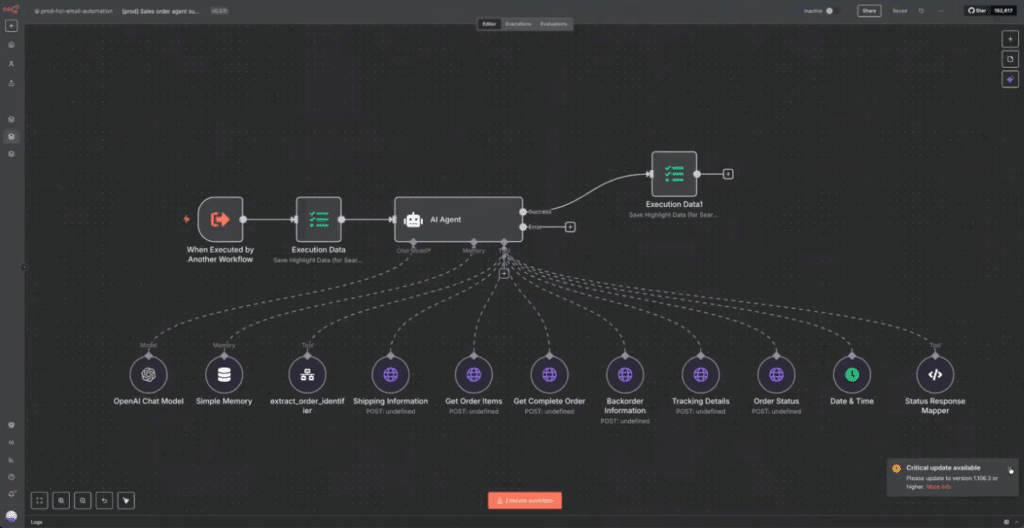
On the n8n canvas, a small multi agent workflow might look like this:
- A Chat Trigger node at the top.
- One AI Agent node that acts as the orchestrator.
- Several AI Agent Tool nodes hanging beneath it, each mapped to agent B and other agents that live in separate branches or sub-workflows.
- Code nodes, HTTP Request nodes, database nodes, and custom nodes that act as tools for each agent.
During workflow execution, you can click any node to inspect input, output, and error messages. Visual workflows turn an abstract multi agent system into something you can literally see and reason about.
N8n Overview and Core Components for Multi Agent Orchestration
n8n is an open source, low code workflow automation platform. It connects apps, APIs, and services inside visual workflows and can be self-hosted or run in the cloud.
For multi agent solutions, several core components matter:
- Trigger nodes such as Webhook, Chat Trigger, and Schedule.
- The AI Agent node that configures each AI agent.
- The AI Agent Tool node that exposes other agents as tools.
- Code nodes and HTTP Request nodes that let developers call APIs and write custom logic.
- Database and storage nodes for logs, memory, and outputs.
Because n8n supports self-hosting, teams can control where data lives and how credentials are managed, which is important for security sensitive AI systems.
Want a full tour of n8n before you dive into agents?
Read n8n Guide 2026: Features and Workflow Automation Deep Dive for a complete overview of the platform, node types, and real world examples.
Core Components and Node Types: Agent Node, AI Nodes, Code Nodes, Custom Nodes, and Other Agents
When you are building multi agent systems in n8n, you combine several node families.
- Agent node and related AI nodes
The AI Agent node holds the system prompt, model choice, memory configuration, and output schema for each agent. Supporting AI nodes provides extra capabilities such as embeddings, classification, or summarization. - Tools based on code nodes and HTTP Request nodes
Code nodes and custom nodes let you write JavaScript for complex transforms or for wrapping internal APIs. HTTP Request nodes handle calls to external services that do not yet have native integrations. - Other agents used as tools
The AI Agent Tool node maps to other agents or sub-workflows. That is how one orchestrator agent can call agent B and sub-agents while still staying inside a single visual workflow. - Data nodes and database nodes
These nodes read and write structured data, store logs, and support reporting. - Control nodes for workflow automation
If, Switch, Merge, and similar node types decide how information moves between agents, tools, and data stores.
Together, these components form the core components of multi agent orchestration in n8n.
N8n vs Zapier vs Make: Why Teams Choose n8n for Multi Agent Solutions
Compared with Zapier or Make, n8n has a different center of gravity.- It is open source and supports self-hosting on your own infrastructure.
- It accepts unlimited nodes per workflow and is comfortable with complex logic and multiple agents.
- It has strong support for writing code through code nodes and custom nodes.
- n8n vs Zapier: The Definitive 2026 Automation Face-Off
- n8n vs Make: Which Automation Tool Survives 2026’s Hidden Limits?
Traditional Workflow Automation vs Agent Based AI Workflows in n8n
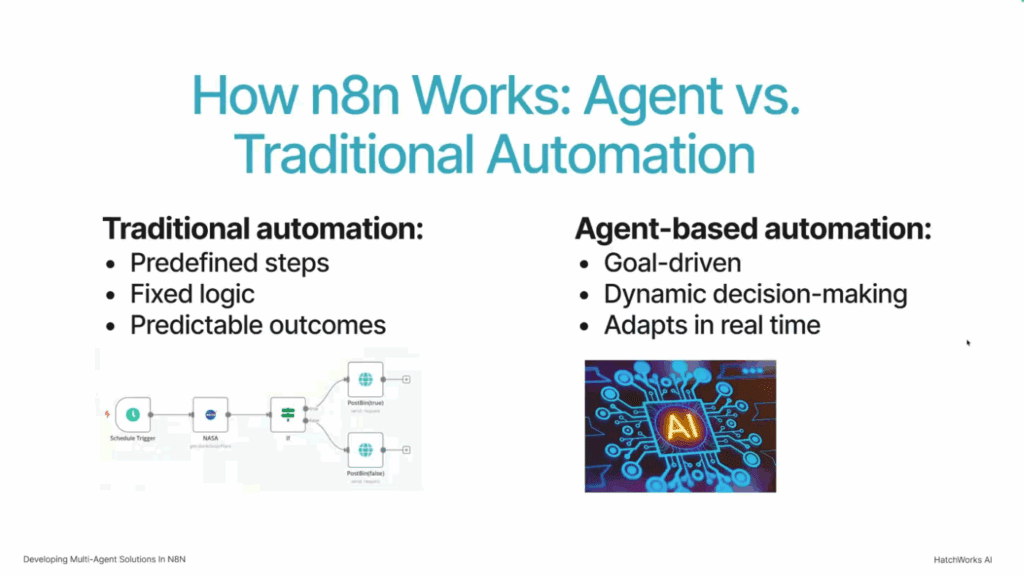
Traditional workflow automation in n8n looks like this:
- A trigger fires at a given time or after a specific event.
- Data moves through a fixed series of nodes with predefined logic.
- Outcomes are predictable because the flow is deterministic.
Agent-based AI workflows change the middle of that story.
- An AI agent reads unstructured input such as an email, chat, or document.
- It decides which tools to call based on its system prompt and model.
- It returns structured outputs that downstream nodes can use.
In practice, you often combine the two styles.
Deterministic nodes handle strict business rules and safety checks. Agents interpret natural language and coordinate work when there are many possible paths.
Want to master standard workflows before you add AI?
Multi agent systems work best when you already understand core n8n patterns. Check out How to Use n8n for Workflow Automation (Step by Step With Examples) to practice triggers, branches, and integrations with clear, hands-on examples.
When Generalist Agents Fall Short and You Need Multiple Agents
The first instinct is often to build one large generalist agent:
- It has access to all tools and all systems.
- Its system prompt explains every rule across sales, support, and operations.
- You keep bolting on new capabilities whenever a new requirement appears.
This approach works briefly and then becomes fragile.
Any change in tools, models, or prompts can cause unexpected side effects. Debugging is slow because no one can tell where a behavior lives.
Multiple AI agents avoid this trap:
- A support agent deals only with user messages and ticket creation.
- A policy agent works only with policy documents and RAG tools.
- A QA agent evaluates responses but never calls live systems.
Each agent has one clear responsibility and a tight set of tools and node types. That makes workflows easier to understand and maintain as they grow.
Multi Agent Workflows and the Single Responsibility Principle
The Single Responsibility Principle is a useful lens for multi agent workflows.
Each agent should handle one clear responsibility.
In n8n terms that means:
- One agent for order retrieval and ERP access.
- Another agent for policy interpretation and messaging.
- Another agent for validation, safety checks, or tone control.
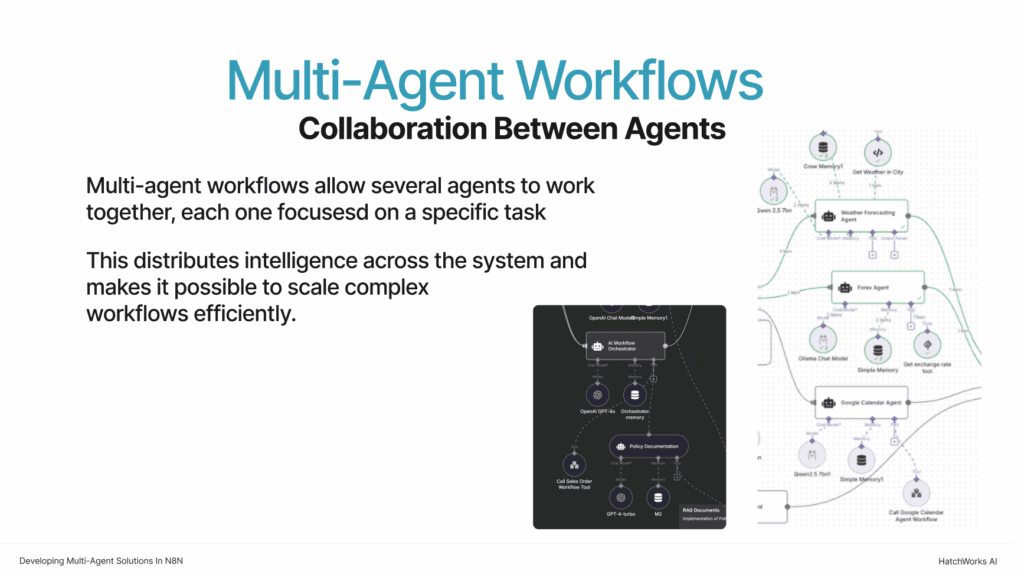
This structure encourages modular design, easier testing, and safer updates. You can change tools or prompts for one agent without surprising the rest of the multi agent system.
Two Patterns for Multi Agent Systems in n8n: Routing by Branch vs Orchestrator Agent
When creating multi-agent solutions in n8n, two patterns show up over and over.
- Routing by branch.
- An orchestrator agent that delegates to sub-agents.
Both rely on the same building blocks. The details are slightly different, so we will look at each in turn.
Text Classifier and Sub Workflows: Multi Agent Workflows Using Multiple Agents per Branch
In the routing pattern, a typical flow is:
- A webhook receives a user’s email.
- A text classifier AI node labels it as order status, policy question, billing, or out of scope.
- A Switch node sends the workflow execution into the branch that matches the label.
- Inside each branch, a sub workflow runs with a focused agent and its own tools.
You might have:
- A sales order agent that uses HTTP Request nodes and code nodes to talk to an ERP or NetSuite.
- A policy agent that uses a vector store and AI nodes for RAG responses.
- A fallback path that escalates complex workflows directly to humans.
You end up with multiple agents across the system, even though each branch is simple on its own.
Orchestrator Agent and Sub Agents: Multiple AI Agents as Tools in One Multi Agent System
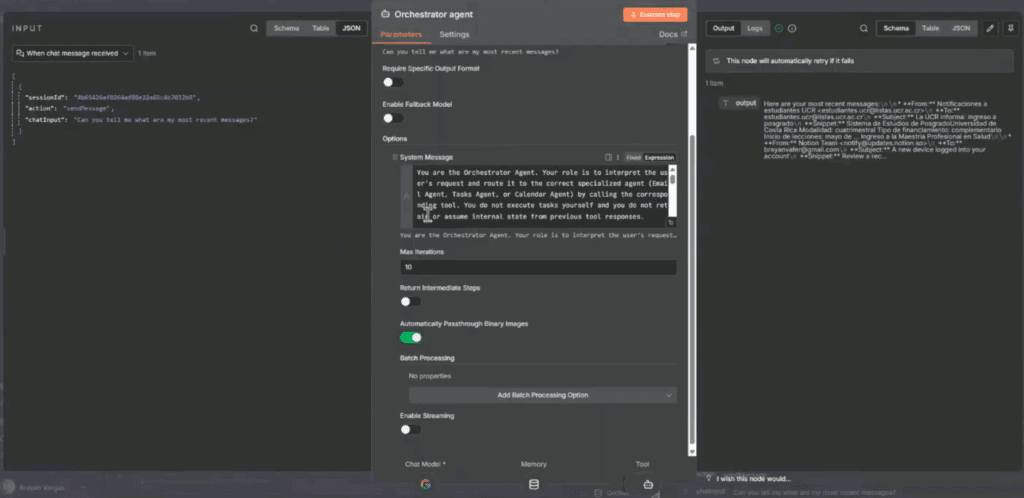
The orchestrator pattern relies on the AI Agent Tool node.
- A chat trigger or webhook sends input to the orchestrator AI Agent node.
- The agent’s system prompt defines several tools, such as Email Agent, Task Agent, Calendar Agent, and Policy Agent.
- Each tool maps to another agent node or a subworkflow that exposes business logic and data.
The orchestrator can then:
- Call the Email Agent to read or send messages.
- Call the Task Agent to create or complete items in a task system.
- Call the Calendar Agent to check availability and schedule events.
Model Context Protocol and an MCP client tool can also be used so that agents in other systems participate through a standard interface.
Because sub-agents are tools, you can add or remove them without redesigning the whole workflow. This pattern is ideal for chat-based assistants that act across many systems.
Building Multi Agent Solutions in n8n: Real Client Email Support Workflow
Consider an e-commerce support scenario.
- A customer email arrives and is forwarded to an n8n webhook.
- Code nodes clean up the HTML, extract text, and add metadata such as language or channel.
- An AI node classifies the intent.
- A Switch node routes the workflow to a subworkflow for orders, policy, or other issues.
- Specialized agents handle each category and write drafts that human agents can review.
n8n’s workflow automation features make it easy to combine AI agents, node types, and business rules in one place.
Tools and Data: ERP, Vector Store, and Gmail Drafts as Workflow Outputs
Inside the orders branch, you might see:
- An agent node with a system prompt that instructs the agent to answer only order-related questions.
- Tools built on HTTP Request and code nodes that query an ERP or CRM and return structured order data.
- Google Drive or database nodes for logging.
Inside the policy branch:
- A policy agent with access to a vector store of policies.
- AI nodes that perform retrieval and answer generation.
The workflow then uses a Gmail node to create drafts rather than send emails directly, so humans stay in control of the final send.
QA Validator, Accuracy Metrics, and Thumbs Up or Down Feedback
To keep outputs reliable, many teams add a QA validator agent. This agent:
- Receives the draft response and relevant context.
- Checks for hallucinations, missing data, policy conflicts, and tone issues.
- Returns a status such as ok, needs revision, or escalate to a human.
On top of that, you can implement a thumbs-up or thumbs-down mechanism inside the agent desktop or email client. Those signals, plus short comments, feed back into a database. Over time, this dataset helps refine prompts, tools, and fallback logic.
Observability and Logging: How Multi Agent Workflows Talk to Humans
Multi agent systems introduce new complexity, so observability is a first-class requirement.
Typical practices:
- Use Execution Data nodes and database nodes to capture key fields from each run, such as user, category, agents used, and final status.
- Store logs in a database or data warehouse for analysis.
- Add error handling paths that send alerts when certain nodes fail repeatedly.
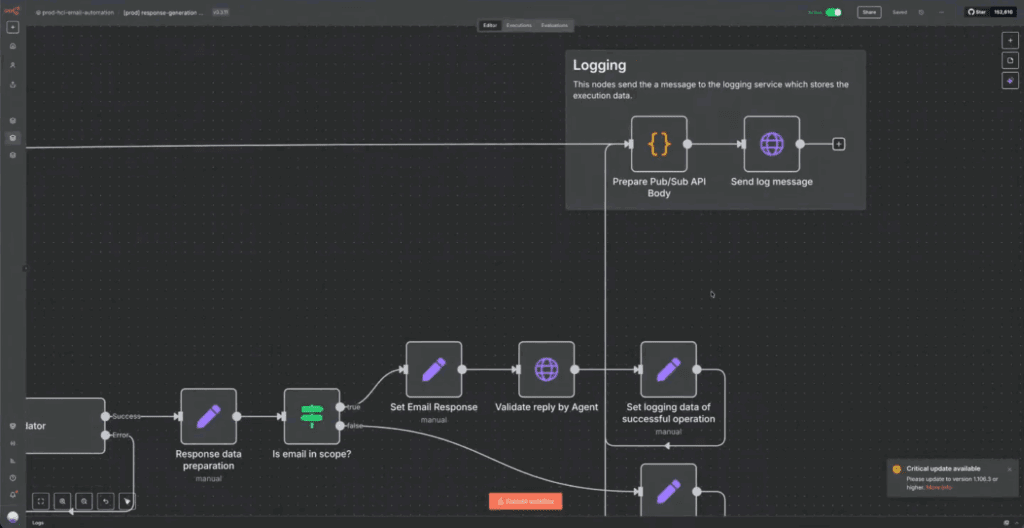
These logs become the main way the system communicates with developers and operators. They reveal where agents need new tools, where models misinterpret inputs, and where business rules need to be tightened.
Execution Metadata: Categories, Trace IDs, and Agent Responses as Queryable Data
Good logs start with good metadata.
For each workflow run, capture:
- A trace or correlation ID.
- The input source and category label.
- Which agents were involved, and which tools they used.
- Key fields from the agent’s final response, for example, policy name, order number, or resolution code.
Once this metadata is stored in a database, product and operations teams can query it to see patterns in volume, failure modes, and performance.
Feedback Dashboards: From Log Tables and Google Sheets to Accuracy Reports
From there, it is natural to build simple dashboards that show:
- Counts of resolved vs escalated items.
- Error rates by agent or tool.
- Satisfaction or quality trends based on thumbs-up and thumbs-down feedback.
These dashboards help non-technical stakeholders understand how the multi agent system is performing and where to invest engineering time next.
Personal Productivity Example: Orchestrator Agent Managing Email, Tasks, and Calendar
Multi agent systems in n8n are not limited to customer support. You can also use them for personal productivity.
In this case:
- A chat trigger receives natural language commands.
- An orchestrator agent interprets what the user wants.
- It uses tools to call Email, Task, and Calendar agents.
Example requests:
- “What tasks do I have today?”
- “Explain the last security email in my inbox and create a follow-up task.”
- “Schedule a meeting with my manager next Thursday around 3 pm.”
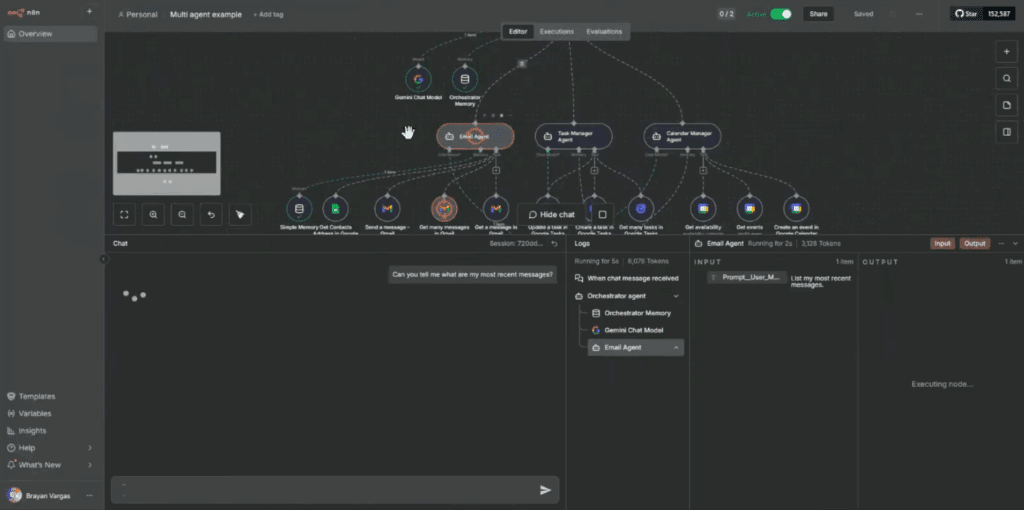
The user interacts with one chat interface while multiple agents and workflows handle the details.
Email AI Agent: Reading, Summarizing, and Acting on Gmail Messages
The email agent in this system typically:
- Uses Gmail nodes to list recent messages and pull specific ones by ID.
- Summarizes content using an AI node.
- Creates or sends replies through Gmail nodes when instructed.

The orchestrator keeps track of message IDs inside its memory and passes them between nodes, so the user does not need to copy and paste anything.
Task and Calendar Agents: Tasks, Availability, and Multi-Step Scheduling Logic
The task agent:
- Connects to Google Tasks or another task platform.
- Creates tasks with due dates and descriptions.
- Lists and completes tasks on request.
The calendar agent:
- Checks existing events through Calendar nodes.
- Detects conflicts before creating new events.
- Proposes alternate times, then confirms with the user.
Most of the scheduling logic lives in a combination of the calendar agent’s system prompt and code nodes that handle date math and edge cases. The orchestrator agent coordinates everything so the user can simply chat.
Platform Operations: Self-Host, Versioning, and Dev or Stage, or Prod Workflows
Running multi agent systems in production requires solid operations practices.
- Many teams self-host n8n on Kubernetes or VMs so they can control networking, credentials, and scale.
- Workflows and custom nodes are stored in Git repositories as JSON, so code review, history, and rollbacks are possible.
- Separate dev, staging, and production environments prevent experimental agents from touching live data.
These steps bring AI workflows into the same operational world as other critical systems.
Self-Hosting and Connectivity: Working with Local Instances, Webhooks, and External APIs
A few practical notes about connectivity:
- Self-hosted instances can call external APIs through HTTP Request nodes without issue.
- External systems can reach n8n using webhooks or, when that is not possible, through MCP and an MCP client tool if you adopt Model Context Protocol patterns.
- Secrets and credentials stay inside your environment, which is often a requirement for regulated industries.
This flexibility is part of why n8n is attractive for multi agent solutions that involve sensitive data.
Limits and Tradeoffs: Library Size, Technical Complexity, and Why Teams Still Choose n8n
It is also important to name the tradeoffs.
- n8n has fewer out-of-the-box integrations than long-running SaaS automation tools.
- Building complex workflows requires comfort with JSON, HTTP APIs, and sometimes writing code in code nodes.
- Some users report that the AI Agent node can be heavier than direct model API calls for very high volume workloads.
For multi agent systems that demand custom logic, self-hosting, and tight security, most teams find these tradeoffs acceptable in exchange for control.
From Exploration to Agentic AI Automation and the AI Agent Opportunity Lab
Multi agent solutions in n8n are one pattern inside a broader Agentic AI Automation strategy.
The goal is not just to add AI to workflows, but to create AI systems that mirror how teams actually work:
- Clear responsibilities.
- Shared tools and data.
- Measurable outcomes.
For organizations that are still figuring out where to start, the AI Agent Opportunity Lab is a good first step.
It helps teams:
- Map current workflows and business processes.
- Identify where AI agents and multi agent systems will produce real value.
- Decide which workflows should stay as simple automations and which justify multi agent orchestration.
From there, you can decide whether n8n is the right platform or whether another solution fits better.
Implementation Checklist for Multi Agent Solutions in n8n
To wrap up, here is a checklist you can use with your team:
- Define agents
List the roles you need and apply the Single Responsibility Principle so each agent has one main job. - Choose your pattern
Decide between routing by branch, orchestrator agent, or a mix. - Design tools and data access
For each agent, define which tools it can use, which APIs or databases it can access, and what its system prompt should say. - Set up observability
Capture execution metadata in a database, including trace IDs, categories, agents, and outputs. - Create environments
Use dev, stage, and prod instances and keep secrets and credentials safe. - Add feedback loops
Include QA validator agents, human override paths, and thumbs-up or thumbs-down feedback from users. - Iterate
Treat multi agent systems like products. Watch logs, talk to users, refine prompts and tools, and let the workflows evolve.
Done well, multi-agent solutions in n8n move you from interesting AI prototypes to dependable automation that quietly handles complexity in the background while your human teams focus on the work that really needs them.