As automation becomes foundational to how teams build, scale, and adapt, platforms like n8n are stepping into the spotlight.
What you need to know: n8n is an AI native workflow automation tool designed to simplify and streamline your processes. It combines visual design with the flexibility of custom code, making it ideal for both tech-savvy users and non-technical professionals.
Key Takeaways
- n8n is a versatile workflow automation tool that combines visual design with coding capabilities, making it suitable for both technical and non-technical users.
- Key features of n8n include over 200 integrations, a user-friendly visual editor, and support for collaboration through Git control and role-based access.
- Organizations can choose between self-hosting for data security and compliance or cloud hosting for convenience, depending on their specific needs.
What is n8n? (No-Code Meets Code-Level Flexibility)
In a nutshell: n8n is a developer-friendly workflow automation platform that combines the speed of no-code with the power and control of full-code orchestration along with AI native capabilities.
n8n (pronounced “n-eight-n”) is a fair-code licensed workflow automation platform that blends the speed of no-code with the flexibility of full-code development.
The name is a clever numeronym derived from “nodemation”, a fusion of node and automation, with the “8” representing the eight letters between the first and last “n.”
While other platforms like Zapier or Make emphasize simplicity, n8n goes further. It gives teams the ability to:
- Self-host the platform
- Write custom JavaScript
- Build modular subflows
- Integrate APIs directly.
- Native AI capabilities built in
You get a visual editor that’s intuitive for fast iteration, but under the hood, it’s powerful enough for complex business logic, branching conditions, and agentic AI orchestration.
n8n thrives in environments where automation needs to embed intelligence, scale repeatable systems, and orchestrate complex workflows end-to-end.
It’s increasingly used across AI development, data engineering, DevOps, and business operations, whether it’s powering RAG pipelines, syncing internal tools, or orchestrating multi-step product workflows.
Why Technical Teams Choose n8n Over Other Platforms
While no-code tools like Zapier, Make, and Tray.io have made automation more accessible, they often fall short for technical teams who need more than surface-level control. That’s where n8n stands out.
For developers, DevOps engineers, and technical product teams, n8n offers the rare combination of code-level flexibility and visual programming speed, without locking you into a black-box ecosystem.
Here’s why more engineering teams are choosing n8n as their go-to automation infrastructure:
n8n gives you full control over your data and infrastructure
Most no-code platforms promise speed, but few offer the control or extensibility technical teams need to scale with confidence.
At its core, n8n is open-source and fair-code licensed. That means you can see how it works, change what you need, and run it where it makes sense for you. That’s true whether behind a firewall, in a private cloud, or air-gapped entirely from the internet.
This is critical for teams handling sensitive data, compliance requirements, or operating in regulated environments. When workflows touch user PII, financial transactions, or protected health data, sending that through someone else’s cloud just isn’t an option.
With n8n, you’re the owner of your own automation infrastructure.
Here’s what that looks like in practice:
- Self-host your instance in AWS, Azure, GCP, or on-prem
- Keep credentials and tokens in your environment
- Customize your own workflows and platform behavior to match your stack
- Extend functionality without waiting for a vendor roadmap
n8n was built for developers
Where other tools abstract away complexity, n8n leans into it because real engineering problems aren’t solved with “plug and play.”
You can:
- Drop into code wherever needed
- Pass data between systems with precision
- Structure workflows like a developer would structure a backend system.
Yet it still moves fast. The visual editor lets you sketch out automations quickly, test node by node, and deploy without writing a full app from scratch.
It’s dev-first without being dev-only. That makes it ideal for teams that span engineering, product, and ops.
n8n has a thriving, open community behind it
One of the strongest signals that a platform is built to last? A community that contributes, teaches, and evolves alongside it. n8n has all three.
With over 34,000 GitHub stars, a growing collection of open-source nodes, and thousands of shared workflow templates, n8n is becoming a movement. Developers around the world are solving real problems and sharing those solutions openly.
The n8n community delivers:
- Active forums and Discord groups with fast support
- Marketplace of user-contributed nodes and templates
- Docs that don’t assume you’re non-technical
- Transparent roadmap and changelogs you can actually follow
Core Features That Set n8n Apart in 2026
n8n is designed for teams that want to automate across systems without giving up flexibility or control. It supports both quick, visual workflow building and deeper customization when needed.
Here are some of its core features that make that possible:
- Drag-and-drop visual interface that scales from basic automations to deeply technical use cases. It’s fast to learn, but it doesn’t force you to stay surface-level.
- AI Workflow Builder (text to workflow) that lets you describe what you want in natural language and auto-generates a working workflow with nodes, logic, and configuration that you can refine instead of building from scratch.
- Native JavaScript support inside Function nodes, so you can manipulate data, build logic, or bridge APIs without leaving your workflow.
- Flexible triggers and webhook handling for starting workflows based on real-time events, scheduled intervals, or external API calls.
- Real-time error handling, scoped execution, and visual logs that make debugging fast and transparent—no more guessing where things broke.
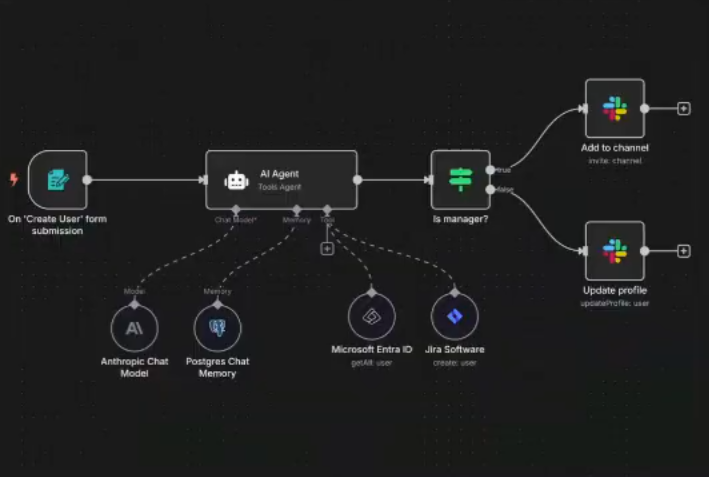
- Built-in AI Agent builder that lets you design context-aware agents with memory, tools, and guardrails, so AI agents can reason, branch, and act across your systems using the same workflow canvas.
- 400+ modular, open-source nodes for services like Slack, PostgreSQL, OpenAI, S3, and beyond—plus the ability to build your own when needed.
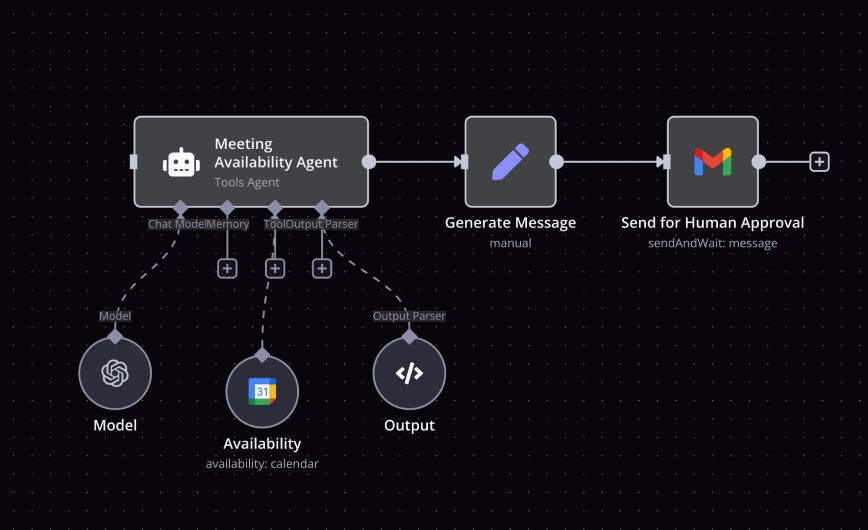
These features aren’t groundbreaking on their own. What makes n8n different is how they come together in one platform. They let technical teams build workflows that are fast to prototype, but still reliable in production.
Secure Workflow Automation: n8n’s Self-Hosted Advantage
n8n offers a fully supported self-hosted deployment model, giving engineering teams complete control over where automation runs and how it’s secured. Instead of sending workflows, credentials, or payloads through a third-party cloud, everything stays within your own environment.
This is a key differentiator for teams working under compliance frameworks like:
- HIPAA (healthcare): Maintain protected health data within your infrastructure.
- GDPR (EU): Ensure personal data doesn’t cross borders unintentionally.
- SOC 2: Keep control over system access, logging, and auditability.

Self-hosting also supports organizations with data residency requirements, internal API access constraints, or security policies that prohibit third-party execution of logic.
n8n can be deployed via Docker for quick setups, or run in Kubernetes for production-scale orchestration. It’s infrastructure-agnostic, so it fits into most existing DevOps workflows.
How n8n Handles AI Automation Workflows
AI workflows involve multiple steps, tools, and systems working together. n8n makes that orchestration easier by providing native connectors for LLM providers like OpenAI, Hugging Face, Cohere, and others, alongside tools for prompt engineering, data enrichment, and post-processing. This lets you build end-to-end AI pipelines without leaving the workflow editor. Imagine writing a single workflow where an incoming email is summarized by an LLM, sentiment is analyzed, and follow-up actions are triggered. For example, you could build a workflow like:- A new inbound lead submits a form
- n8n runs sentiment analysis using Cohere
- If negative sentiment is detected, the workflow notifies the sales team via Slack with context
- The event is logged in HubSpot for tracking.
n8n for Developers: Built for Flexibility and Extensibility
n8n gives developers the tools they need to build, extend, and manage complex workflows while maintaining control over logic and deployment.
At the core are Function nodes, which allow native JavaScript to be written directly within workflows. This is useful for transforming data, applying conditional logic, or bridging between APIs without adding external dependencies.
When more structure is needed, developers can use the n8n CLI or SDK to build custom nodes. These are packaged, reusable modules that integrate with internal APIs, manage custom auth flows, or wrap third-party services not available in the public node library.
For teams deploying in production environments, Git-based versioning helps manage workflow changes over time. It enables code review, rollback, and CI/CD-style releases.
That’s especially important for enterprise environments with multiple contributors or regulatory constraints.
n8n also supports custom plugins that stay private. You can load nodes from your own registry or file system, giving you a secure way to extend functionality without exposing internal integrations.
How n8n Supports Hybrid Teams Across a Workflow Lifecycle
n8n is well-suited for hybrid teams that include product managers, engineers, data analysts, and operators. It helps these teams move from early prototypes to production-ready automation without switching tools or rewriting core logic.
This is because the visual interface lets non-developers design and test workflows quickly. They can map out logic, align with stakeholders, and handle simple automations without having to write any code.
As complexity increases, developers can extend these workflows using Function nodes, external scripts, or custom integrations. This allows teams to incrementally layer in structure, validation, and control.
n8n also integrates directly with services like PostgreSQL, S3, Redis, and RabbitMQ, making it easy to connect with infrastructure and data sources already in place.
At HatchWorks AI, we lean on this flexibility when building MVPs. Early versions may be assembled visually to validate core logic with product stakeholders.
Once the flow is proven, our engineering teams extend it with scripted logic and system integrations, turning early-stage experiments into production-ready solutions with minimal rework.
Need help building scalable AI-driven workflows?
HatchWorks AI specializes in turning early-stage ideas into production-ready solutions using tools like n8n.
From MVP automation to complex AI integrations, explore our AI Automation services to see how we can support your next build.
Data Privacy and Control in n8n Workflows
In an automation-first world, every workflow is a potential point of data exposure. Many cloud-based automation tools process and store workflow data on their own infrastructure—adding an unseen risk layer for teams working with sensitive or regulated information.
n8n takes a different approach. By default, it does not sync workflow data to third-party servers. When self-hosted, all execution happens inside your own environment. This is especially important when integrating with tools that handle customer or operational data, such as:
- Stripe – Avoid exposing payment data to third-party automation layers
- Slack – Manage internal communication flows without leaking message content
- Notion – Sync internal documentation or knowledge without routing it through vendor-owned clouds
Relevance Across High-Risk Industries
This level of control is important for teams working in:
Fintech, where transaction and identity data must remain private
Healthcare, where HIPAA compliance restricts external data sharing
Legal tech, where client data and case files are tightly regulated
n8n’s model offers teams the ability to automate confidently, knowing their workflows and data stay inside the systems they trust.
Cloud vs. Self-Hosting: Which One is Right for You?
n8n offers two deployment models: n8n Cloud and self-hosted. Each is suited to different teams and priorities. In this section, we’ll walk you through both and give you tips on how to decide between them.
When n8n Cloud Makes Sense
For smaller teams, startups, or those without in-house DevOps support, the managed cloud version is often the fastest path to value. It offers:
- Instant setup—no need to provision infrastructure
- Maintenance-free operation—backups, upgrades, and scaling are handled
- Hosted in the EU or the US to meet basic data location requirements
You can start building workflows immediately, then scale up as needed.
When Self-Hosting makes sense
For teams with complex needs, especially around security, infrastructure control, or system integration, self-hosting unlocks deeper capabilities:
- Full customization of authentication, logging, and system behavior
- Private plugins and nodes that don’t need to be shared externally
- Advanced security configurations, including private networking and container orchestration
- Control over infrastructure, including how workflows scale and where data lives
Deciding Between the Two
Here’s a quick framework to guide the decision:
| Consideration | n8n Cloud | Self-Hosted |
|---|---|---|
|
Setup Time
|
Minutes
|
Hours to days
|
|
Maintenance
|
Fully managed
|
Your responsibility
|
|
Data Privacy
|
Moderate (EU/US hosted)
|
Full control
|
|
Custom Integrations
|
Limited to public plugins
|
Fully customizable
|
|
Infrastructure Access
|
No
|
Yes
|
|
Best For
|
Startups, solo builders
|
Fintech, healthcare, enterprise
|
Our HatchWorks AI Recommendation
At HatchWorks AI, we typically recommend starting with n8n Cloud for MVPs, prototypes, or early-stage experimentation.
But for clients in regulated industries or those building long-term automation infrastructure, we transition to self-hosted deployments where security, observability, and customization matter most.
n8n vs Zapier vs Make.com: Side-by-Side Comparison
All three platforms are built for automation. But their strengths differ depending on your team’s needs, technical depth, and control requirements.
| n8n | Zapier | Make.com | |
|---|---|---|---|
|
Pricing
|
Free/self-hosted or paid cloud
|
Free + tiered paid plans
|
Free + tiered paid plans
|
|
Self-hosting
|
✅ Full support
|
❌ Not supported
|
❌ Not supported
|
|
Custom code support
|
✅ Native JS + node SDK
|
⚠️ Code steps (limited)
|
⚠️ Code steps (limited)
|
|
AI tools integration
|
✅ Native and extensible
|
⚠️ Some OpenAI/third-party apps
|
⚠️ Limited native AI options
|
|
Visual editor
|
✅ Full workflow view
|
⚠️ Linear task builder
|
✅ Scenario-style layout
|
|
Extensibility
|
✅ Build nodes/plugins, SDK
|
⚠️ App-based, closed ecosystem
|
⚠️ Some HTTP/custom modules
|
|
Version control
|
✅ Git-compatible workflows
|
❌ Not supported
|
❌ Not supported
|
|
Best For
|
Developers, hybrid teams
|
Non-technical users
|
Visual automation enthusiasts
|
What sets n8n apart is how it treats automation as a first-class development concern rather than just a productivity hack. Developers can write real JavaScript, manage workflows like code, and extend the platform via CLI, SDK, and APIs.
This means teams can build logic-rich workflows with branching, loops, conditions, error handling, and even autonomous agent workflows that interact with AI or internal systems.
It’s more than “if this, then that” because it’s orchestration that matches how real systems operate.
Real-World Use Cases for n8n in 2026
Teams are using n8n to connect systems, reduce manual work, and automate logic that previously lived in scripts, spreadsheets, or siloed tools. Below are a few ways it’s being applied in production settings.
Internal Workflow Automation
For IT and ops teams, n8n helps automate common internal processes like onboarding, support requests, and offboarding.
A new hire trigger can:
- Create accounts
- Assign tasks in project tools
- Open tickets in helpdesk systems
- Notify stakeholders from a single workflow
Support flows can:
- Route tickets based on type
- Auto-tag issues
- Escalate based on priority or inactivity
These automations reduce friction across departments without needing to build new internal apps from scratch.
Marketing Automation and CRM Sync
In marketing, n8n connects form submissions, CRMs, enrichment tools, and communication platforms.
For example, a lead captured through a web form can be:
- Enriched via an external API
- Scored using business logic
- Routed into a CRM with tags that drive follow-up sequences
Teams can also sync changes between systems to keep contacts, deal stages, and campaign data aligned.
The ability to customize each step, without a bloated martech stack, makes it easier to iterate, scale, and keep costs low.
Data Pipelines and ML Ops
Data teams use n8n to move data across systems: pulling from APIs or databases, transforming it, and loading it into warehouses or dashboards. It also supports orchestration across ML pipelines, triggering model retraining, syncing outputs, or flagging failed jobs.
Because workflows can be versioned, tested in isolation, and monitored with logs, they’re easier to maintain than a patchwork of scripts and cron jobs.
AI Agent Orchestration
With growing support for LLMs and AI models, n8n now enables agent-style workflows where logic makes decisions as well as executes tasks. A support ticket could be analyzed for sentiment, summarized, and routed with relevant knowledge base content attached. A marketing agent could draft and schedule follow-ups based on campaign performance.
These agents can act across systems, using APIs, databases, and models as tools.
For example, consider a product support agent built in n8n:
- A user submits a request through a support form.
- The workflow calls OpenAI to summarize the issue and classify intent.
- Based on classification, it branches: querying a knowledge base, tagging in a human, or triggering a follow-up task.
- The response is composed and sent via the original channel (e.g., email or chat).
- All interactions are logged for future training or audit.
Want to get a handle on AI agents fast? Check out AI Agents Explained: Functions, Types, and Applications for a clear breakdown of what they are and how they work.
How to Get Started with n8n in 2026
Whether you’re exploring n8n for AI-powered workflows, internal automation, or data orchestration, getting started is straightforward.
Here’s a basic three-step approach: picking your deployment model, building your first workflow, and using templates to speed things up.
Step 1: Choose Your Deployment Method
Earlier on in this guide, we mentioned you could choose between the n8n cloud or to self-hosting. Well, when you get started with the platform, you’ll have to make your choice.
Use n8n Cloud if you want to skip setup and maintenance. It’s hosted by the n8n team, with instant provisioning and built-in scaling. Ideal for prototyping, solo users, or teams that don’t need infrastructure control.
Use Docker to self-host if data privacy, customization, or integration with internal systems is a priority. The Docker setup gives you full access to logs, execution history, custom nodes, and the ability to persist data via Docker volume mounting.
To get started with self-hosting, follow n8n’s official Docker installation guide. You can deploy locally, on a VM, or on container orchestration platforms like Kubernetes.
Both options give you access to the full feature set.
Step 2: Build Your First AI-Powered Workflow
Once n8n is up and running, the fastest way to understand its potential is by building a simple, real-world flow. Here’s a quick example that combines email, AI, and messaging:
- Trigger: A new email arrives in Gmail
- Action 1: Pass the email content to OpenAI for summarization
- Action 2: Send the summary to a Slack channel
This flow highlights n8n’s native AI capabilities and how easily they connect to everyday tools. You can configure each step in the visual editor, adding API credentials, defining prompts, and mapping data between nodes without writing glue code.
To build this:
- Start with a Gmail trigger (use OAuth2 to connect your account).
- Add an OpenAI node, select the ‘chat’ model, and prompt it to summarize the email content.
- Add a Slack node and connect it to a channel where your team receives updates.
You can test the workflow in real time and tweak prompts or logic as needed. This simple chain already shows how powerful n8n can be for intelligent automation. and it’s just a few nodes deep.
Step 3: Use the Templates Library to Accelerate
n8n includes a built-in Templates Library that lets you skip the blank canvas and start with pre-built workflows. These templates cover common use cases like:
- Lead scoring
- Webhook listeners
- AI summarization and multi-step automations across tools like HubSpot, Airtable, Slack, Notion, and more
To access templates:
- Click the “Templates” tab inside your n8n instance—or browse the public library online.
- Search by app, category, or keyword.
- Import the workflow directly into your workspace and customize it.
Templates are especially useful for creating workflows that combine less familiar services or use complex logic (e.g., conditional routing, data merging, or trigger chaining). They’re also great for learning best practices, like how to structure error handling or use sub-workflows to reduce complexity.
For example, if you’re building an OpenAI-powered summarizer like the one in Step 2, you can start from a ready-made template and just plug in your own accounts and content sources.
Advanced Tips for Scaling n8n in Production
Once your workflows move beyond basic use cases, you’ll need to think about how to scale n8n reliably. Below are three key areas where engineering teams can level up their deployment.
Scale with Redis and Queue Mode
For high-throughput environments, n8n supports a queue mode that distributes workflow execution across multiple worker processes. This mode uses Redis to coordinate tasks and unlocks horizontal scaling through clustering.
By spinning up multiple workers and separating them from the main instance (which handles the UI and triggering), you can process workflows concurrently—ideal for API-heavy or event-driven automation.
Manage Secrets Securely with Vaults
n8n supports encrypted credential storage out of the box, but for teams with stricter requirements, secrets can be externalized into tools like HashiCorp Vault or environment-based secrets managers.
This gives you tighter control over API keys, tokens, and credentials.
Profile and Optimize Workflow Performance
As workflows grow in complexity, they can become harder to debug or optimize. Use n8n’s execution logs, built-in error handling, and manual run mode to diagnose bottlenecks.
For larger deployments, consider:
- Breaking workflows into smaller, testable sub-flows
- Using trigger conditions and filters early in the flow to reduce load
- Monitoring workflow runtime and failure patterns via your logging stack (e.g. Prometheus, Grafana)
This type of profiling becomes essential as you scale from proof of concept to production-grade automation.
Top n8n Nodes You Should Be Using in 2026
With over 400 integrations available, n8n’s node library is one of its biggest strengths. But with that flexibility comes choice overload. Here’s a breakdown of the most essential, most popular, and most underrated nodes based on real usage and workflow patterns.
|
Must-Have Core Nodes
|
|
These nodes give you full control over logic, timing, and external interaction.
|
|
Most Popular App Integrations
|
|
If you're building AI tools, internal dashboards, or marketing automations, these are the high-leverage nodes.
|
|
Niche but Powerful
|
|
These nodes unlock advanced behaviors that elevate your workflows from simple automations to full-on orchestration.
|
n8n Community, Plugins, and Ecosystem Support
Beyond the platform itself, n8n’s strength is its ecosystem. There’s an active community, a growing plugin marketplace, and constant contributions from teams pushing the boundaries of what’s possible.
A GitHub-First, Community-Driven Project
As an open-source platform, n8n’s development happens in the open. The GitHub repo has over 40k stars, with regular contributions from the core team and community developers alike. Feature requests, bug reports, and pull requests are all public, giving developers transparency and influence over the roadmap.
The n8n Community Forum is another key hub, and it’s useful for debugging, sharing workflows, or getting feedback on edge-case use cases.
Templates, Plugins, and the Node Marketplace
n8n now supports a growing marketplace of custom nodes and workflow templates. These community-built components help teams move faster. New custom integration nodes are added regularly, and teams can even publish their own private plugins or internal tool connectors for in-house use.
Where to Learn and Stay Current
The n8n team maintains multiple high-signal channels, including:
- The n8n Discord for real-time Q&A
- The YouTube channel for feature demos and tutorials
- The official blog for releases, guides, and deep dives
These are great resources for both new users and teams scaling into more advanced workflows. You can also turn to us, HatchWorks AI as we regularly share our learnings and experiments. Right now, we’re exploring how to contribute to this growing ecosystem, especially in the areas of agent workflows, AI orchestration, and advanced enterprise templates.
Our Labs team is building reusable patterns and nodes that make it easier to deploy AI-native automation across industries like fintech, healthcare, and legal tech.
Check out our on-demand and upcoming labs here.
Should You Use n8n?
If you’re looking for a workflow automation platform that balances accessibility with control, n8n is one of the strongest choices in 2026.
It gives teams the speed of no-code through a clean, visual builder. Developers can inject logic, build custom nodes, version workflows, and deploy in environments they own. And with self-hosting, teams retain full control over their own data, execution, and compliance.
n8n is especially well-suited for:
- Tech-forward startups that want to build fast without accruing automation debt
- Hybrid teams blending product, dev, and ops skillsets
- AI builders orchestrating LLMs, agents, and model-based workflows
- Enterprises that need automation can self-host, audit, and extend
At HatchWorks AI, we consistently recommend n8n to clients who need a flexible automation backbone—particularly when AI, compliance, and cross-system orchestration are in play.
It’s a scalable, developer-friendly platform that fits into real infrastructure, real workflows, and real business goals.
How HatchWorks AI Uses n8n to Accelerate Client Solutions
At HatchWorks AI, we build AI-powered software solutions that move fast without sacrificing technical depth. n8n is a key part of how we do that.
Our clients come to us with complex problems: AI orchestration, data-driven workflows, secure integrations across cloud and on-prem.
We use n8n to rapidly prototype automations, test logic with real users, and evolve systems incrementally.
Why do our technical teams trust it?
- It supports creating workflows visually, but allows us to drop to code when needed
- It integrates easily into modern stacks—Postgres, Redis, Docker, you name it
- It gives us version control and testability, which are non-negotiable at scale
- It’s an AI native platform we can extend—perfect for agent-based automation work
n8n helps us deliver faster, adapt quicker, and move from proof-of-concept to production with minimal friction. That’s exactly what clients need in 2026.
Want us to build your next project using n8n? Get in touch with us here, or let us teach you how to do it for yourself.